1. Home
  2. News
  3. Download
    1. Thunderbird Release Version
    2. Thunderbird 153 ESR (2026)
    3. Thunderbird 140 ESR (2025)
    4. Thunderbird Beta Version
    5. Language Pack (User Interface)
    6. Dictionaries (Spell Check)
  4. Help & Lexicon
    1. Instructions for Thunderbird
    2. Questions & Answers (FAQ) about Thunderbird
    3. Help for this Website
    4. Last Changes
  5. Forums
    1. Unresolved Threads
    2. Latest Posts
    3. Threads of the last 24 hours
  • Login
  • Register
  • 
  • Search
This Thread
  • Everywhere
  • This Thread
  • This Forum
  • Forum
  • Lexicon
  • Articles
  • Pages
  • More Options
  1. Thunderbird Mail DE
  2. Forum
  3. Hilfe zu Add-ons und manuellen Anpassungen
  4. Manuelle Anpassungen per CSS oder Script

Symbolleiste links reloaded v128

    • 128 ESR
    • Windows
  • family-admin
  • January 6, 2025 at 10:42 AM
  • Closed
  • Thread is Resolved
  • family-admin
    Junior Member
    Posts
    3
    Member since
    6. Jan. 2025
    • January 6, 2025 at 10:42 AM
    • #1

    Die Methode im alten Thread funktioniert nicht mehr richtig.

    Das Standard-Adressbuch verschwindet zwar, aber dasjenige von CardBook erscheint trotzdem als Letztes. Meine Vermutung ist, dass es daran liegt, dass dieses Symbol zeitlich etwas später angezeigt wird und es dann für eine Neuanordnung nicht mehr reicht.

    Gibt es einen aktuellen Weg, das alte Ziel zu erreichen?

  • Go to Best Answer
  • graba January 6, 2025 at 11:04 AM

    Approved the thread.
  • Bastler
    Guest
    • January 6, 2025 at 3:06 PM
    • #2
    Quote from family-admin

    Gibt es einen aktuellen Weg, das alte Ziel zu erreichen?

    Hallo,
    nicht so wie früher und nur gequengelt von Hinten durch die Brust ins Auge. ;)

    Es gibt neuerdings 2 Bereiche, einen für die TB default Buttons und einen für Add-ons.
    Ich verlagere den Bereich für Addons nach Oben und hebe durch negativen margin-bottom
    den unteren Rand an. Mit dem Wert ist auch für die Verteilung zu spielen.
    Leider sitzt der CardBook Button dann ganz oben.
    Jedes weitere Add-on, welches sich dahinein setzt, verbiegt die Ansicht.

    Der Rest wie gehabt, wobei der TB Adressbuch Button ausgeblendet ist.

    CSS
    /* ---Bereiche-Symbolleiste CardBook Button verlagern--- */
    /* ---reservierten Bereich fuer Add-ons nach oben--- */
    #spacesToolbarAddonsContainer.spaces-toolbar-container {
    appearance: none !important;
    position: relative !important;
    order: -1 !important;
    max-height: 40px !important; 
    margin-bottom: -630px !important; /* Wert anpassen */
    }
    
    #addressBookButton.spaces-toolbar-button {
    appearance: none !important;
     display: none !important; 
    }
    Display More

    original Bereiche verdreht

    Edited 2 times, last by Bastler: Code angepasst (January 6, 2025 at 4:55 PM).

  • family-admin
    Junior Member
    Posts
    3
    Member since
    6. Jan. 2025
    • January 6, 2025 at 8:24 PM
    • #3

    Zuoberst will ich das Icon nicht. Die Antwort klingt aber so kompetent, dass ich es als Bestätigung sehe, dass es heute nicht mehr möglich ist, die Reihenfolge beliebig zu wählen. Danke dafür.

  • family-admin January 6, 2025 at 8:24 PM

    Selected a post as the best answer.
  • Bastler
    Guest
    • January 6, 2025 at 10:55 PM
    • Best Answer
    • #4
    Quote from family-admin

    Zuoberst will ich das Icon nicht.

    Ich habe nochmal gebastelt, es könnte Dir gefallen. Bedenke, jedes Hinzufügen / Entfernen von Buttons ändert stark.
    Feintuning zur Lage vorsichtig in kleinen Schritten und die Richtung beobachten.
    Nach jeder Änderung ist TB Neustart notwendig.

    Den vorherigen Code vollständig entfernen.

    CSS
    /* ---Bereiche-Symbolleiste Freiraum unter Mail Button schaffen---*/
    #mailButton.spaces-toolbar-button {
    appearance: none !important;
    order: -1 !important;
    margin-bottom: 30px !important;
    }
    
    /* ---Bereiche-Symbolleiste TB Adressbuch Button ausblenden--- */
    #addressBookButton.spaces-toolbar-button {
    appearance: none !important;
     display: none !important; 
    }
    
    /* ---Bereiche-Symbolleiste CardBook Button verlagern--- */
    /* ---mit eingeblendetem TB Adressbuch Button, "margin-top" 30px negativer setzen--- */
    #cardbook_vigneau_philippe-spacesButton-CardBook.spaces-toolbar-button.spaces-addon-button {
    appearance: none !important;
    margin-top: -130px !important;
    }
    Display More

    Edited 3 times, last by Bastler: Code angepasst (January 8, 2025 at 12:19 AM).

  • family-admin
    Junior Member
    Posts
    3
    Member since
    6. Jan. 2025
    • January 27, 2025 at 8:59 AM
    • #5

    Super, es geht also doch!

    Ich habe noch das Eule-Plugin, also musste ich die Werte etwas anpassen. Läuft bei mir jetzt mit folgenden Einstellungen:

    CSS
    /* ---Bereiche-Symbolleiste Freiraum unter Mail Button schaffen---*/
    #mailButton.spaces-toolbar-button {
    appearance: none !important;
    order: -1 !important;
    margin-bottom: 28px !important;
    }
    
    /* ---Bereiche-Symbolleiste TB Adressbuch Button ausblenden--- */
    #addressBookButton.spaces-toolbar-button {
    appearance: none !important;
     display: none !important; 
    }
    
    /* ---Bereiche-Symbolleiste CardBook Button verlagern--- */
    /* ---mit eingeblendetem TB Adressbuch Button, "margin-top" 30px negativer setzen--- */
    #cardbook_vigneau_philippe-spacesButton-CardBook.spaces-toolbar-button.spaces-addon-button {
    appearance: none !important;
    margin-top: -164px !important;
    }
    Display More

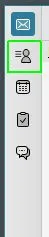
    Resultat:

  • family-admin January 27, 2025 at 9:00 AM

    Selected a post as the best answer.
  • Community-Bot January 28, 2026 at 4:30 AM

    Closed the thread.

Current app version

  • Thunderbird 153.0.3 veröffentlicht

    Thunder August 12, 2026 at 12:57 PM

Current 153 ESR version

  • Thunderbird 153.0.3 ESR veröffentlicht

    Thunder August 12, 2026 at 2:18 PM

Current 140 ESR version

  • Thunderbird 140.13.0 ESR veröffentlicht

    Thunder July 22, 2026 at 7:16 PM

No Advertisements

There are no advertisements here. Maybe you give the website owner (Alexander Ihrig - aka "Thunder") instead something to be able to finance these sites in the long run. Many Thanks!

Thank you for the support!

Coffee to be spent?

Donate now via Paypal*

*Forwarding to PayPal.Me

Thunderbird Mail DE
  1. Imprint & Contact
  2. Privacy Policy
    1. Cookie Policy
  3. Terms of Use
  4. Donation Call for Thunderbird
Help for this website
  • All website support articles
  • How to use website search
  • How to create a forums user account
  • How to create and edit a forums thread
  • How to reset your forums password
Copyright © 2003-2026 Thunderbird Mail DE

You are NOT on an official page of the Mozilla Foundation. Mozilla®, mozilla.org®, Firefox®, Thunderbird™, Bugzilla™, Sunbird®, Seamonkey®, XUL™ and the Thunderbird logo are (among others) registered trademarks of the Mozilla Foundation.

Powered by WoltLab Suite™