1. Home
  2. News
  3. Download
    1. Thunderbird Release Version
    2. Thunderbird 153 ESR (2026)
    3. Thunderbird 140 ESR (2025)
    4. Thunderbird Beta Version
    5. Language Pack (User Interface)
    6. Dictionaries (Spell Check)
  4. Help & Lexicon
    1. Instructions for Thunderbird
    2. Questions & Answers (FAQ) about Thunderbird
    3. Help for this Website
    4. Last Changes
  5. Forums
    1. Unresolved Threads
    2. Latest Posts
    3. Threads of the last 24 hours
  • Login
  • Register
  • 
  • Search
Everywhere
  • Everywhere
  • Forum
  • Lexicon
  • Articles
  • Pages
  • More Options
  1. Thunderbird Mail DE
  2. ChaosRacer

Posts by ChaosRacer

  • Änderung des Button "Neue Nachricht" im FolderPane-Grundsatzfrage

    • ChaosRacer
    • October 19, 2023 at 8:10 PM
    • Best Answer

    Guten Abend zusammen,

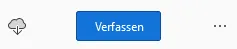
    das + Zeichen und den Originalen Text kann man mit dem folgenden Code ausblenden und durch einen beliebigen eigenen Text ändern. Ggf. muß man etwas mit den Werten probieren, je nachdem welchen Text man einsetzen möchte.

    CSS
    /* --- + Neue Nachricht - Button ändern --- */
    
    /* --- + Neue Nachricht ausblenden --- */
    #folderPaneWriteMessage.button {
      appearance: none !important;
      background-image: none !important;
      color: transparent !important;
      position: relative !important;
    }
    /* --- Content ersetzen, positionieren & einblenden --- */
    #folderPaneWriteMessage.button::after {
      appearance: none !important;
      content: 'Verfassen' !important;
      color: #fff !important;
      position: absolute !important;
      top: 6px !important;
      left: 18px !important; /* ohne "#folderPaneWriteMessage.button.icon-button" z.B. 38px verwenden */
    }
    /* --- Buttongröße an Content anpassen --- */
    #folderPaneWriteMessage.button.icon-button {
      appearance: none !important;
      padding-inline-start: unset !important;
      padding-inline-end:  unset !important;
    }
    Display More

    Man kann den Codeschnipsel #folderPaneWriteMessage.button.icon-button auch weglassen, dann wird der Button in Originalgröße angezeigt. Um den Text dann zu zentrieren kann man dann den left entsprechend ändern, wie im Code angemerkt. Da kann man dann varriieren wie es einem gefällt.

  • Posts

Current app version

  • Thunderbird 155.0 veröffentlicht

    Thunder September 2, 2026 at 5:45 PM

Current 153 ESR version

  • Thunderbird 153.2.0 ESR veröffentlicht

    Thunder September 2, 2026 at 5:55 PM

Current 140 ESR version

  • Thunderbird 140.15.0 ESR veröffentlicht

    Thunder September 2, 2026 at 6:01 PM

No Advertisements

There are no advertisements here. Maybe you give the website owner (Alexander Ihrig - aka "Thunder") instead something to be able to finance these sites in the long run. Many Thanks!

Thank you for the support!

Coffee to be spent?

Donate now via Paypal*

*Forwarding to PayPal.Me

Thunderbird Mail DE
  1. Imprint & Contact
  2. Privacy Policy
    1. Cookie Policy
  3. Terms of Use
  4. Donation Call for Thunderbird
Help for this website
  • All website support articles
  • How to use website search
  • How to create a forums user account
  • How to create and edit a forums thread
  • How to reset your forums password
Copyright © 2003-2026 Thunderbird Mail DE

You are NOT on an official page of the Mozilla Foundation. Mozilla®, mozilla.org®, Firefox®, Thunderbird™, Bugzilla™, Sunbird®, Seamonkey®, XUL™ and the Thunderbird logo are (among others) registered trademarks of the Mozilla Foundation.

Powered by WoltLab Suite™