1. Home
  2. News
  3. Download
    1. Thunderbird Release Version
    2. Thunderbird 140 ESR
    3. Thunderbird 128 ESR
    4. Thunderbird 115 ESR
    5. Thunderbird Beta Version
    6. Language Pack (User Interface)
    7. Dictionaries (Spell Check)
  4. Help & Lexicon
    1. Instructions for Thunderbird
    2. Questions & Answers (FAQ) about Thunderbird
    3. Help for this Website
    4. Last Changes
  5. Forums
    1. Unresolved Threads
    2. Latest Posts
    3. Threads of the last 24 hours
  • Login
  • Register
  • 
  • Search
This Thread
  • Everywhere
  • This Thread
  • This Forum
  • Forum
  • Lexicon
  • Articles
  • Pages
  • More Options
  1. Thunderbird Mail DE
  2. Forum
  3. Hilfe zu Verschlüsselung & elektronische Signatur
  4. S/MIME Verschlüsselung & Unterschrift

Signatur aus Email in Thunderbird speichern

    • 60.*
    • Windows
  • christiande
  • May 17, 2019 at 7:44 PM
  • Closed
  • Thread is Unresolved
  • christiande
    Junior Member
    Posts
    3
    Member since
    17. May. 2019
    • May 17, 2019 at 7:44 PM
    • #1

    Um Rückfragen vorzubeugen, bitten wir um folgende Angaben:

    • Thunderbird-Version: 60.6.1
    • Betriebssystem + Version: Windows 7
    • Kontenart (POP / IMAP): POP
    • Postfachanbieter (z.B. GMX):
    • Eingesetzte Antivirensoftware:Norton Security
    • Firewall (Betriebssystem-intern/Externe Software):Norton Security

    Hallo


    Ich nutze Thunderbird schon lange und auch mit eigener Signatur und Zertifikat von Comodo für meine GMX Adresse. Bisher gabs keine Probleme.

    ABER

    Zur Zeit habe ich Emailkontakt mit jemand, der mir Mails schickt mit Signatur. Ich kann sie öffnen und lesen aber wenn ich antworte kann ich diese Antwort nicht verschlüsselt zurücksenden.

    Wenn ich eine Mail von ihm bekomme ist das Vorhängeschloss zu aber der Briefumschlag hat ein rotes Kreuz.
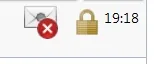
    Es sieht so aus alsob ich die Signatur nicht speichern kann.

    Normal heißt es doch, daß beim öffnen der Mail der Schlüssel gespeicher wird. Irgendwie funktioniert das mit dieser Mail nicht.

    Mein Mailpartner hat sein Zertifikat hierher: https://www.dgn.de/e-mail-zertifikat-dgncert/

    Weiß hier jemand woran das liegen kann was ich da machen kann?

    LG

    Christian

  • Thunder May 17, 2019 at 7:48 PM

    Approved the thread.
  • Community-Bot September 3, 2024 at 8:40 PM

    Closed the thread.

Current app version

  • Thunderbird 148.0.1 veröffentlicht

    Thunder March 10, 2026 at 10:27 PM

Current 140 ESR version

  • Thunderbird 140.8.1 ESR veröffentlicht

    Thunder March 10, 2026 at 10:50 PM

No Advertisements

There are no advertisements here. Maybe you give the website owner (Alexander Ihrig - aka "Thunder") instead something to be able to finance these sites in the long run. Many Thanks!

Thank you for the support!

Coffee to be spent?

Donate now via Paypal*

*Forwarding to PayPal.Me

Thunderbird Mail DE
  1. Imprint & Contact
  2. Privacy Policy
    1. Cookie Policy
  3. Terms of Use
  4. Donation Call for Thunderbird
Help for this website
  • All website support articles
  • How to use website search
  • How to create a forums user account
  • How to create and edit a forums thread
  • How to reset your forums password
Copyright © 2003-2026 Thunderbird Mail DE

You are NOT on an official page of the Mozilla Foundation. Mozilla®, mozilla.org®, Firefox®, Thunderbird™, Bugzilla™, Sunbird®, Seamonkey®, XUL™ and the Thunderbird logo are (among others) registered trademarks of the Mozilla Foundation.

Powered by WoltLab Suite™
