1. Home
  2. News
  3. Download
    1. Thunderbird Release Version
    2. Thunderbird 153 ESR (2026)
    3. Thunderbird 140 ESR (2025)
    4. Thunderbird Beta Version
    5. Language Pack (User Interface)
    6. Dictionaries (Spell Check)
  4. Help & Lexicon
    1. Instructions for Thunderbird
    2. Questions & Answers (FAQ) about Thunderbird
    3. Help for this Website
    4. Last Changes
  5. Forums
    1. Unresolved Threads
    2. Latest Posts
    3. Threads of the last 24 hours
  • Login
  • Register
  • 
  • Search
This Thread
  • Everywhere
  • This Thread
  • This Forum
  • Forum
  • Lexicon
  • Articles
  • Pages
  • More Options
  1. Thunderbird Mail DE
  2. Forum
  3. Hilfe zu E-Mail und allgemeines Arbeiten
  4. Allgemeines Arbeiten / Konten einrichten / Installation & Update

Thunderbird Mail Synchronisation

    • 115 ESR
    • Windows
  • Larry
  • March 4, 2024 at 12:09 PM
  • Closed
  • Thread is Unresolved
  • Larry
    Junior Member
    Posts
    2
    Member since
    4. Mar. 2024
    • March 4, 2024 at 12:09 PM
    • #1

    Subject: Thunderbird Mail Synchronisation
    Provider: A1 Account (Austria)
    E-Mail Address Format: IMAP
    Thunderbird Release: 115.08.0 (32-Bit), Updated standard download
    Operating System: Windows 10

    Problem description:

    1. When a received e-mail is moved from the TB Inbox to the TB Trash Folder of the A1 account, then the mail disappears on the A1 server account and on the smartphone (Samsung E-Mail).
    2. When a received e-mail is moved from the TB Inbox to one of the TB Local Subfolders, then the mail still remains on the A1 server account and on the smartphone

    3. Only in case the A1 server account is called up (mailbox is empty!) and closed again then the e-mail disappears on the A1 server account and on the smartphone as well.

    It looks like Thunderbird does not send a synchronisation request for the now empty TB inbox after the mail move to a Local TB Subfolder. Only in case the A1 Web Account is called up then the account activates a synchronisation cycle with Thunderbird recognizing the empty TB Inbox.

    Is my assumption correct and if yes, could you provide a solution or do you have another idea for problem analysis/repair?

    Best Regards
    Larry

  • graba March 4, 2024 at 12:17 PM

    Approved the thread.
  • graba March 4, 2024 at 12:17 PM

    Moved the thread from forum Migration / Import / Backups to forum Allgemeines Arbeiten / Konten einrichten / Installation & Update.
  • Bastler
    Guest
    • March 4, 2024 at 1:22 PM
    • #2

    Hello,
    if active filter rules exist, control the entries or deactivate them in the environment Menu -> Tools -> Message-Filters
    and try any times.

    Other deactivate all Add-ons and try. Then activate one and other with test every step.

    Edited once, last by Bastler (March 4, 2024 at 2:35 PM).

  • Larry
    Junior Member
    Posts
    2
    Member since
    4. Mar. 2024
    • March 6, 2024 at 3:45 PM
    • #3

    I have no impact caused by filter rules or addons detected. Yesterday I detected a new processing mode: "After closing TB the rewsidual moved mails disappear from the Smartphone E-Maibox" after few seconds. It looks that TB sends a synch with the now empty Mail In-Box to the smartphone during the closing cycle.

    I have no idea why the new processing mode is now in place. Maybe I have changed something when I tested
    possible Addon and Filter problem sources.

    Regards Larry

  • Bastler
    Guest
    • March 6, 2024 at 4:31 PM
    • #4
    Quote from Larry

    When a received e-mail is moved from the TB Inbox to one of the TB Local Subfolders, then the mail still remains on the A1 server account and on the smartphone

    Is this moving operation really move or a copy behavior?
    A test: hold shift key while pull with mouse as move operation.

    Quote from Larry

    It looks that TB sends a synch with the now empty Mail In-Box to the smartphone during the closing cycle.

    TB never send directly to the smartphone or reverse. Every client in IMAP system works as an remote control.
    Providers server are the base.

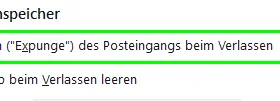
    BTW: in the account preferences -> server preferences are IMHO important setpoint for expunge command to leave TB.
    It affects that deleted mails (also moved) finally delete, same as compress (expunge) command on a folder.
    Preference here (but in german)

    Edited 3 times, last by Bastler (March 6, 2024 at 6:01 PM).

  • Community-Bot March 7, 2025 at 4:30 AM

    Closed the thread.

Current app version

  • Thunderbird 153.0.3 veröffentlicht

    Thunder August 12, 2026 at 12:57 PM

Current 153 ESR version

  • Thunderbird 153.0.3 ESR veröffentlicht

    Thunder August 12, 2026 at 2:18 PM

Current 140 ESR version

  • Thunderbird 140.13.0 ESR veröffentlicht

    Thunder July 22, 2026 at 7:16 PM

No Advertisements

There are no advertisements here. Maybe you give the website owner (Alexander Ihrig - aka "Thunder") instead something to be able to finance these sites in the long run. Many Thanks!

Thank you for the support!

Coffee to be spent?

Donate now via Paypal*

*Forwarding to PayPal.Me

Similar Threads

  • Synchronisation mit Icloud Mail funktioniert nicht richtig

    • snoopyone
    • January 24, 2024 at 3:16 PM
    • Migration / Import / Backups
  • Google Kalender Synchronisation hängt

    • NoHa895
    • November 2, 2023 at 10:39 PM
    • Google-Kalender-Synchronisation
  • Synchronisation von Lokalen Ordnern / gemeinsame Benutzung Lokaler Ordner

    • willibald71
    • October 5, 2023 at 7:14 AM
    • Migration / Import / Backups
  • Synchronisation des Kalendes mit Clouddienst (fruux) funktioniert nicht

    • FGZCara
    • September 21, 2023 at 2:32 PM
    • Externe Kalender / Netzwerkkalender synchronisieren
  • Synchronisation Thunderbird / Google-Kalender funktioniert nur in eine Richtung (Google ► TB)

    • Feuervoegelchen38
    • August 5, 2023 at 8:22 PM
    • Google-Kalender-Synchronisation
  • Synchronisation - einzelne emails verschwinden

    • guerkov
    • January 31, 2023 at 3:49 PM
    • Allgemeines Arbeiten / Konten einrichten / Installation & Update
Thunderbird Mail DE
  1. Imprint & Contact
  2. Privacy Policy
    1. Cookie Policy
  3. Terms of Use
  4. Donation Call for Thunderbird
Help for this website
  • All website support articles
  • How to use website search
  • How to create a forums user account
  • How to create and edit a forums thread
  • How to reset your forums password
Copyright © 2003-2026 Thunderbird Mail DE

You are NOT on an official page of the Mozilla Foundation. Mozilla®, mozilla.org®, Firefox®, Thunderbird™, Bugzilla™, Sunbird®, Seamonkey®, XUL™ and the Thunderbird logo are (among others) registered trademarks of the Mozilla Foundation.

Powered by WoltLab Suite™