1. Home
  2. News
  3. Download
    1. Thunderbird Release Version
    2. Thunderbird 140 ESR
    3. Thunderbird 115 ESR
    4. Thunderbird Beta Version
    5. Language Pack (User Interface)
    6. Dictionaries (Spell Check)
  4. Help & Lexicon
    1. Instructions for Thunderbird
    2. Questions & Answers (FAQ) about Thunderbird
    3. Help for this Website
    4. Last Changes
  5. Forums
    1. Unresolved Threads
    2. Latest Posts
    3. Threads of the last 24 hours
  • Login
  • Register
  • 
  • Search
This Thread
  • Everywhere
  • This Thread
  • This Forum
  • Forum
  • Lexicon
  • Articles
  • Pages
  • More Options
  1. Thunderbird Mail DE
  2. Forum
  3. Hilfe zu E-Mail und allgemeines Arbeiten
  4. Filter (Regeln), Junk-Filter und Datenschutz-Optionen

Plötzlich auftretender Fehler PR_CONNECT_RESET_ERROR

    • 115 ESR
    • Windows
  • Andreas38871
  • May 3, 2024 at 7:38 PM
  • Closed
  • Thread is Unresolved
  • Andreas38871
    Member
    Posts
    11
    Member since
    30. Oct. 2022
    • May 3, 2024 at 7:38 PM
    • #1

    Ich habe
    Thunderbird 115.10.1
    Windows 11 Pro Build 22631.3447
    Kontenart POP
    Postfachanbieter T-Online
    Eingesetzte Antivirensoftware: Kaspersky Internet Security 21.3.10.391(I)

    Mein Rechner läuft 24/7, sowohl der Firefox als auch Thunderbird laufen ebenso 24/7.
    Seit gestern, ca. 22.00 Uhr ist weder Empfang noch Senden von E-Mails möglich. Bei Neustart erscheint immer
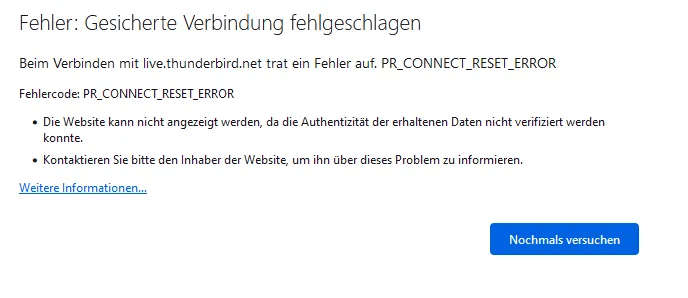
    Ich habe u.a. auch die Thunderbird-Startseite deaktiviert, Kaspersky deaktiviert, alles hat nicht geholfen. Auch meine Suche im Internet brachte keine Ergebnisse. Hat jemand eine Idee woran es liegen könnte?

    Vielen Dank für Eure Hilfe!
    Andreas

  • Grisu2099
    Senior Member
    Reactions Received
    506
    Posts
    707
    Member since
    8. Oct. 2023
    Helpful answers
    8
    • May 3, 2024 at 7:42 PM
    • #2
    Quote from Andreas38871

    Kaspersky deaktiviert

    Wenn überhaupt, mußt du das Kasperle testweise deinstallieren - deaktivieren reicht da nicht aus...

    Gerade Kaspersky ist bekannt dafür, daß er sich immer mal wieder in Sachen einmischt, die ihn nichts angehen...

  • Community-Bot May 4, 2025 at 4:31 AM

    Closed the thread.

Current app version

  • Thunderbird 152.0.1 veröffentlicht

    Thunder July 4, 2026 at 1:02 PM

Current 140 ESR version

  • Thunderbird 140.12.1 ESR veröffentlicht

    Thunder July 4, 2026 at 1:05 PM

No Advertisements

There are no advertisements here. Maybe you give the website owner (Alexander Ihrig - aka "Thunder") instead something to be able to finance these sites in the long run. Many Thanks!

Thank you for the support!

Coffee to be spent?

Donate now via Paypal*

*Forwarding to PayPal.Me

Thunderbird Mail DE
  1. Imprint & Contact
  2. Privacy Policy
    1. Cookie Policy
  3. Terms of Use
  4. Donation Call for Thunderbird
Help for this website
  • All website support articles
  • How to use website search
  • How to create a forums user account
  • How to create and edit a forums thread
  • How to reset your forums password
Copyright © 2003-2026 Thunderbird Mail DE

You are NOT on an official page of the Mozilla Foundation. Mozilla®, mozilla.org®, Firefox®, Thunderbird™, Bugzilla™, Sunbird®, Seamonkey®, XUL™ and the Thunderbird logo are (among others) registered trademarks of the Mozilla Foundation.

Powered by WoltLab Suite™