1. Home
  2. News
  3. Download
    1. Thunderbird Release Version
    2. Thunderbird 140 ESR
    3. Thunderbird 115 ESR
    4. Thunderbird Beta Version
    5. Language Pack (User Interface)
    6. Dictionaries (Spell Check)
  4. Help & Lexicon
    1. Instructions for Thunderbird
    2. Questions & Answers (FAQ) about Thunderbird
    3. Help for this Website
    4. Last Changes
  5. Forums
    1. Unresolved Threads
    2. Latest Posts
    3. Threads of the last 24 hours
  • Login
  • Register
  • 
  • Search
This Thread
  • Everywhere
  • This Thread
  • This Forum
  • Forum
  • Lexicon
  • Articles
  • Pages
  • More Options
  1. Thunderbird Mail DE
  2. Forum
  3. Hilfe zu E-Mail und allgemeines Arbeiten
  4. Allgemeines Arbeiten / Konten einrichten / Installation & Update

Nach jedem In-Applikations-Update Reste der alten Installation vorhanden

    • 91.*
    • Windows
  • pluggi
  • January 26, 2022 at 7:45 PM
  • Closed
  • Thread is Unresolved
  • pluggi
    Junior Member
    Posts
    1
    Member since
    26. Jan. 2022
    • January 26, 2022 at 7:45 PM
    • #1

    Hallo zusammen,

    ich beobachte schon länger, dass nach jedem In-Applikations-Update (Hilfe->Über Thunderbird), in der App Auflistung von Windows (Start->Einstellung->Apps & Features) immer noch die ältere Thunderbird-Version aufgeführt wird.
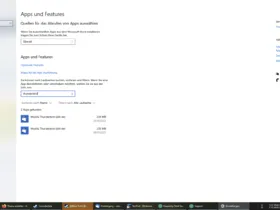
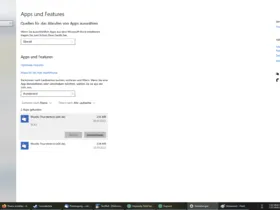
        

    Als Workaround kann ich im Anschluss an das Update eine manuelle Deinstallation und anschließende Installation durchführen.

    Aber das ist sicherlich nicht der Sinn des In-Applikations-Updates.

    Gleiches gilt übrigens auch für das In-Applikations-Update von Firefox.

    Hat jemand eine Idee, wie ich den Fehler vermeiden kann?

    Anbei noch die Fakten zur bestehenden Installation:

    • Thunderbird-Version 91.5.1 (64-Bit)

    • Betriebssystem + Version: Windows 10 Pro, 21H2

    • Kontenarten: POP & IMAP

    • Postfachanbieter ISP, GMX, Web.de

    • Eingesetzte Antivirensoftware: Kaspersky Total Security, v21.3.10.391 (g)

    • Firewall (Betriebssystem-intern/Externe Software): Kaspersky (s.o.)

    Besten Dank im Vorraus

    pluggi

  • graba January 26, 2022 at 7:50 PM

    Approved the thread.
  • Community-Bot September 3, 2024 at 8:50 PM

    Closed the thread.

Current app version

  • Thunderbird 152.0.1 veröffentlicht

    Thunder July 4, 2026 at 1:02 PM

Current 140 ESR version

  • Thunderbird 140.12.1 ESR veröffentlicht

    Thunder July 4, 2026 at 1:05 PM

No Advertisements

There are no advertisements here. Maybe you give the website owner (Alexander Ihrig - aka "Thunder") instead something to be able to finance these sites in the long run. Many Thanks!

Thank you for the support!

Coffee to be spent?

Donate now via Paypal*

*Forwarding to PayPal.Me

Similar Threads

  • Schlagworte werden nicht mehr zugewiesen.

    • Madtrick
    • September 19, 2020 at 3:33 PM
    • Allgemeines Arbeiten / Konten einrichten / Installation & Update
  • Thunderbird-Profil aus 68.* in eine neue 78*-Version übernehmen

    • Mattes
    • September 3, 2020 at 3:02 PM
    • Migration / Import / Backups
Thunderbird Mail DE
  1. Imprint & Contact
  2. Privacy Policy
    1. Cookie Policy
  3. Terms of Use
  4. Donation Call for Thunderbird
Help for this website
  • All website support articles
  • How to use website search
  • How to create a forums user account
  • How to create and edit a forums thread
  • How to reset your forums password
Copyright © 2003-2026 Thunderbird Mail DE

You are NOT on an official page of the Mozilla Foundation. Mozilla®, mozilla.org®, Firefox®, Thunderbird™, Bugzilla™, Sunbird®, Seamonkey®, XUL™ and the Thunderbird logo are (among others) registered trademarks of the Mozilla Foundation.

Powered by WoltLab Suite™