1. Home
  2. News
  3. Download
    1. Thunderbird Release Version
    2. Thunderbird 140 ESR
    3. Thunderbird 115 ESR
    4. Thunderbird Beta Version
    5. Language Pack (User Interface)
    6. Dictionaries (Spell Check)
  4. Help & Lexicon
    1. Instructions for Thunderbird
    2. Questions & Answers (FAQ) about Thunderbird
    3. Help for this Website
    4. Last Changes
  5. Forums
    1. Unresolved Threads
    2. Latest Posts
    3. Threads of the last 24 hours
  • Login
  • Register
  • 
  • Search
This Thread
  • Everywhere
  • This Thread
  • This Forum
  • Forum
  • Lexicon
  • Articles
  • Pages
  • More Options
  1. Thunderbird Mail DE
  2. Forum
  3. Hilfe zu Add-ons und manuellen Anpassungen
  4. Manuelle Anpassungen per CSS oder Script

Kontenbezeichnung individuel einfärben

    • Tb version not relevant
    • Windows
  • MSFreak
  • January 30, 2022 at 10:08 PM
  • Closed
  • Thread is Unresolved
  • MSFreak
    Senior Member
    Reactions Received
    1,102
    Posts
    4,012
    Member since
    23. Oct. 2019
    Helpful answers
    83
    • January 30, 2022 at 10:08 PM
    • #1

    Moin liebe Kollegen und liebe Grüße aus dem mittlerweile sturmfreien Hamburg,

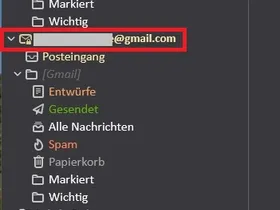
    mit eurer Hilfe habe ich es vor längerer Zeit verwirklichen können, die Kontenbezeichnungen pauschal einzufärben (siehe Screenshot).

    Meine Idee wäre es dies zu verfeinern. Z.B. @gmail.com grün und @http://outlook.de/com blau.

    Geht das überhaupt. Denn, wenn man mehrere Mailkonten hat wäre es zumindest für mich übersichtlicher.

    Vielen Dank für eure Antworten und noch einen schönen Abend.
    Das ist übrigens der derzeit aktuelle CSS-Code

    CSS
    /* Farbe Kontenbezeichnung Ordner und Icon */
    #folderTree > treechildren::-moz-tree-cell-text(isServer-true) {
    font-weight: bold !important; 
    font-family: New York !important;
    font-size: 15px !important;
    color: #F3E2A9 !important; }
    
    .tabmail-tab[type="folder"][ServerType="imap"],
    treechildren::-moz-tree-image(folderNameCol, isServer-true, serverType-imap)  
    { moz-appearance:none !important; fill: #F3E2A9 !important; }
    
    treechildren::-moz-tree-cell-text(folderNameCol, specialFolder-Inbox) {
    color: #F3E2A9 !important; } 
    treechildren::-moz-tree-cell-text(folderNameCol, specialFolder-Junk) {
    color: #FA8258 !important; }
    treechildren::-moz-tree-cell-text(folderNameCol, specialFolder-Sent) {
    color: #5FB404 !important; }
    treechildren::-moz-tree-cell-text(folderNameCol, specialFolder-Trash) {
    color: #A4A4A4 !important; }
    treechildren::-moz-tree-cell-text(folderNameCol, specialFolder-Templates) {
    color: #F5D0A9 !important; }
    treechildren::-moz-tree-cell-text(folderNameCol, specialFolder-Drafts) {
    color: #F4A460 !important; } 
    Display More

    Gruß Micha

    Edited 2 times, last by MSFreak: Nachtrag (January 30, 2022 at 11:34 PM).

  • edvoldi
    Moderator
    Reactions Received
    281
    Posts
    7,584
    Member since
    23. Dec. 2005
    Helpful answers
    32
    • January 31, 2022 at 10:07 AM
    • #2

    Hallo MSFreak,

    das habe ich auch noch nicht gefunden, ich spreche diese Bereich so an:

    Code
    .tabmail-tab[type="folder"][SpecialFolder="Inbox"]

    und setzte ein Icon vor der Adresse.

    Gruß

    EDV-Oldie

    WIN11 Home Version 25H2 (Build 26200.8655)

    Thunderbird 140.12.1esr (64-Bit)
    Thunderbird - Beta 153.0b8 (64-Bit)
    Thunderbird - Daily 154.0a1 (64-Bit)

    Firefox 152.0.6(64-Bit)

    Thunderbird-Kalender: FAQ / Erweiterungen für den Kalender / Meine Erweiterungen

    Keine Forenhilfe per Konversation!

  • Community-Bot September 3, 2024 at 8:50 PM

    Closed the thread.

Current app version

  • Thunderbird 152.0.1 veröffentlicht

    Thunder July 4, 2026 at 1:02 PM

Current 140 ESR version

  • Thunderbird 140.12.1 ESR veröffentlicht

    Thunder July 4, 2026 at 1:05 PM

No Advertisements

There are no advertisements here. Maybe you give the website owner (Alexander Ihrig - aka "Thunder") instead something to be able to finance these sites in the long run. Many Thanks!

Thank you for the support!

Coffee to be spent?

Donate now via Paypal*

*Forwarding to PayPal.Me

Thunderbird Mail DE
  1. Imprint & Contact
  2. Privacy Policy
    1. Cookie Policy
  3. Terms of Use
  4. Donation Call for Thunderbird
Help for this website
  • All website support articles
  • How to use website search
  • How to create a forums user account
  • How to create and edit a forums thread
  • How to reset your forums password
Copyright © 2003-2026 Thunderbird Mail DE

You are NOT on an official page of the Mozilla Foundation. Mozilla®, mozilla.org®, Firefox®, Thunderbird™, Bugzilla™, Sunbird®, Seamonkey®, XUL™ and the Thunderbird logo are (among others) registered trademarks of the Mozilla Foundation.

Powered by WoltLab Suite™
