1. Home
  2. News
  3. Download
    1. Thunderbird Release Version
    2. Thunderbird 153 ESR (2026)
    3. Thunderbird 140 ESR (2025)
    4. Thunderbird Beta Version
    5. Language Pack (User Interface)
    6. Dictionaries (Spell Check)
  4. Help & Lexicon
    1. Instructions for Thunderbird
    2. Questions & Answers (FAQ) about Thunderbird
    3. Help for this Website
    4. Last Changes
  5. Forums
    1. Unresolved Threads
    2. Latest Posts
    3. Threads of the last 24 hours
  • Login
  • Register
  • 
  • Search
This Thread
  • Everywhere
  • This Thread
  • This Forum
  • Forum
  • Lexicon
  • Articles
  • Pages
  • More Options
  1. Thunderbird Mail DE
  2. Forum
  3. Hilfe zu Add-ons und manuellen Anpassungen
  4. Manuelle Anpassungen per CSS oder Script

Hilfe zur farblichen Anpassung TB 115.3.1 (64)

    • 115 ESR
    • Windows
  • crumb1
  • October 6, 2023 at 10:27 AM
  • Closed
  • Thread is Resolved
  • crumb1
    Member
    Reactions Received
    7
    Posts
    151
    Member since
    27. Nov. 2020
    Helpful answers
    3
    • October 6, 2023 at 10:27 AM
    • #1

    TB 115.3.1

    Win10 64-

    IMAP

    Strato

    Virus nur WIN Intern

    Hallo

    nach dem ich das Update TB auf 115.3.1 erledigt habe, habe ich schon recht gute Einstellungen aus den hier gezeigten Themen gefunden.

    Bei 2 Themen im CCS Code brauchte ich aber bitte die Hilfe von euch.

    Ich möchte im Dark Thema das Kalenderfeld des aktuellen Tage in der Wochenansicht farblich anpassen.

    Ich möchte den Hintergrund der Mail Vorschau von Weiß wegbringen und farblich anpassen.

    Mein CC habe ich eingefügt. Die ist /War sehr überschaubar und liegt hier C:\Users\xxxxx\AppData\Roaming\Thunderbird\Profiles\756rs7xm.default-release\chrome

    /* Bild im Headerkopf */

    .recipient-avatar.has-avatar {

    min-width: 70px !important;

    min-height: 70px !important;

    }

    Schon mal vorab vielen Dank.

    Gruß Holger

    VG

    Holger

  • graba October 6, 2023 at 10:56 AM

    Moved the thread from forum Allgemeines Arbeiten / Konten einrichten / Installation & Update to forum Manuelle Anpassungen per CSS oder Script.
  • crumb1
    Member
    Reactions Received
    7
    Posts
    151
    Member since
    27. Nov. 2020
    Helpful answers
    3
    • October 6, 2023 at 4:06 PM
    • #2

    Hallo

    ich hab erst einmal in Einstellungen Allgemein Farben auf nicht Systemfarben gestellt. Das wirkt erst einmal.

    Ws noch fehlt und wo ich Hilfe benötge ist der Aktuelle tag in der Wochenansicht des Kalenders.


    Aber mein großes Problem ist nach wie vor das ich über die Entwicklertools nicht den richtigen Parameter finde.

    Ich möchte gern auch die CCS Veränderungen die hier gezeigt werden verstehen um meine eigenen Einstellungen zu machen..

    Wo kann ich ansetzen um das zu erlernen?

    VG

    Holger

    Edited once, last by crumb1 (October 6, 2023 at 4:39 PM).

  • dharkness21
    Senior Member
    Reactions Received
    492
    Posts
    2,051
    Member since
    29. Jun. 2005
    Helpful answers
    55
    • October 6, 2023 at 4:50 PM
    • #3
    Quote from crumb1

    Ws noch fehlt und wo ich Hilfe benötge ist der Aktuelle tag in der Wochenansicht des Kalenders.

    Teste bitte das ↓ in der userChrome.css.

    CSS
    article.day-column-selected .multiday-hour-box {
      background-color: #006800 !important;
      color: #FFF !important;
    }

    und wech

    Dharkness

  • crumb1
    Member
    Reactions Received
    7
    Posts
    151
    Member since
    27. Nov. 2020
    Helpful answers
    3
    • October 6, 2023 at 5:07 PM
    • #4

    Besten Dank dharkness21

    leider wirkt das nicht.

    Ich zeige nochmal genau das Element welches ich farblich anpassen will.

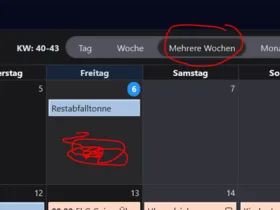
    Ich verwende die Ansicht "mehrere Wochen"

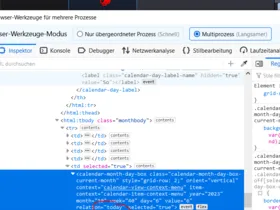
    Selbst habe ich jetzt gesucht und das Element gefunden

    immer rot umkritzelt.

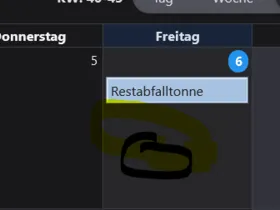
    Die Box ist ja schon leicht eingefärbt durch das Theme, aber ich mag es etwas auffälliger

    CSS
    /* Bild im Headerkopf   */
        .recipient-avatar.has-avatar {
        min-width:  70px !important;
        min-height: 70px !important;
        } 
    /* ---Reihenfolge Leisten--- */
    #toolbar-menubar {
        appearance: none !important;
        order: -1 !important;
    }
    #titlebar > .icons-beside-text {
        appearance: none !important;
        order: 1 !important;
    }
    #tabs-toolbar {
        appearance: none !important;
        order: 2 !important;
    }
    /* ---Neu */
    /* Zebra Folderpane 
    treechildren::-moz-tree-cell(selected, focus) {
        appearance: none !important;
        background-color: #006800 !important;
    }
    
    treechildren::-moz-tree-row(selected) {
        appearance: none !important;
        background-color: #5F5F68 !important;
    }
    treechildren::-moz-tree-row(selected, focus) {
        appearance: none !important;
        background-color: #38383D !important;
    }
    treechildren::-moz-tree-cell-text(selected),
    treechildren::-moz-tree-cell-text(selected, focus) {
        appearance: none !important;
        color: #FFF !important;
    }
    treechildren::-moz-tree-cell-text(hover),
    treechildren::-moz-tree-cell-text(selected, hover),
    treechildren::-moz-tree-cell-text(selected, focus, hover) {
        appearance: none !important;
        color: #000 !important;
    }
    treechildren::-moz-tree-row(hover),
    treechildren::-moz-tree-row(selected, hover),
    treechildren::-moz-tree-row(selected, focus, hover) {
        appearance: none !important;
        background-color: #D1E2F2 !important;
    }
    */
    /* Zebra Threadpane */
    /* zeile56 Linie oben */
    #threadTree tr {
        background-image: none !important;
        background-color: #737576 !important;
    }
    #threadTree tr:nth-child(2n) {
        background-image: none !important;
        background-color: #45505b !important;
    }
    #threadTree tr.selected {
        background-image: none !important;
        background-color: #006800 !important;
    }
    #threadTree tr:nth-child(2n).selected {
        background-image: none !important;
        background-color: #006800 !important;
    }
    #threadTree tr:hover,
    #threadTree tr:nth-child(2n):hover,
    #threadTree tr.selected:hover,
    #threadTree tr:nth-child(2n).selected:hover {
        background-image: none !important;
        background-color: #D1E2F2 !important;
        color: #000 !important;
    }
    
    #threadTree tbody .children.collapsed[data-properties~="hasUnread"][data-properties~="read"] :where(td) {
        appearance: none !important;
        background-color: #F20 !important;
        color: #eee8aa !important;
    }
    #threadTree tbody .children[data-properties~="hasUnread"][data-properties~="read"] :where(td) {
        appearance: none !important;
        background-color: #FF7909 !important;
        color: #000 !important;
    }
    #threadTree tbody .children.collapsed[data-properties~="hasUnread"][data-properties~="read"].selected :where(td) {
        appearance: none !important;
        background-color: #800 !important;
        color: #eee8aa !important;
    }
    #threadTree tbody .children[data-properties~="hasUnread"][data-properties~="read"].selected :where(td) {
        appearance: none !important;
        background-color: #873f05 !important;
        color: #FFF !important;
    }
    #threadTree tbody .children:hover :where(td),
    #threadTree tbody .children.collapsed[data-properties~="hasUnread"][data-properties~="read"]:hover :where(td),
    #threadTree tbody .children[data-properties~="hasUnread"][data-properties~="read"]:hover :where(td),
    #threadTree tbody .children.collapsed[data-properties~="hasUnread"][data-properties~="read"].selected:hover :where(td),
    #threadTree tbody .children[data-properties~="hasUnread"][data-properties~="read"].selected:hover :where(td){
        appearance: none !important;
        background-color: #D1E2F2 !important;
        color: #000 !important;
    }
    
    tr[data-properties~="imapdeleted"][data-properties~="read"] {
        color: #fc4242 !important;
    }
    tr[data-properties~="untagged"][data-properties~="unread"] {
        color: #fc7e00 !important;
    }
    tr[data-properties~="new"][data-properties~="unread"] :where(td) {
        appearance: none !important;
        color: #62cf61 !important;
    }
    /* Neu*/
    article.day-column-selected .multiday-hour-box {
      background-color: #006800 !important;
      color: #FFF !important;
    }
    Display More

    PS: Bekomme ich die CSS noch anders hierher?

    VG

    Holger

  • dharkness21
    Senior Member
    Reactions Received
    492
    Posts
    2,051
    Member since
    29. Jun. 2005
    Helpful answers
    55
    • October 6, 2023 at 5:12 PM
    • #5
    Quote from crumb1

    Ich verwende die Ansicht "mehrere Wochen"

    Und warum schreibst Du dann Wochenansicht? In Zukunft bitte auch das beschreiben was angepasst werden soll und dabei präzise sein.

    Teste bitte das ↓.

    CSS
    calendar-month-day-box[selected="true"] .calendar-month-day-box-list {
      background-color: #D1E2F2 !important;
      color: #000 !important;
    }
    Quote from crumb1

    Bekomme ich die CSS noch anders hierher?

    Wozu, dafür ist die Codebox doch da.

    und wech

    Dharkness

  • crumb1
    Member
    Reactions Received
    7
    Posts
    151
    Member since
    27. Nov. 2020
    Helpful answers
    3
    • October 6, 2023 at 5:20 PM
    • #6

    Hallo dharkneess21

    Danke für den Code.

    Ich bessere mich bei der Beschreibung meines Problems. Jetzt fange ich an!!!

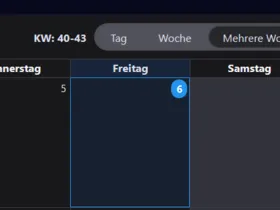
    Also, ich möchte den Hintergrund des aktuellen tages inder Ansicht" mehrere Wochen" im unselektierte/unausgewählten Zustand farblich ändern. Die kleine Blaue Zahl ist mir zu klein.

    Ich brauche nicht die farbliche Änderung bei Auswahl, obwohl das auch cool ist!

    Sorry. Und Danke für deine Hilfe

    VG

    Holger

  • dharkness21
    Senior Member
    Reactions Received
    492
    Posts
    2,051
    Member since
    29. Jun. 2005
    Helpful answers
    55
    • October 6, 2023 at 5:48 PM
    • #7
    Quote from crumb1

    Also, ich möchte den Hintergrund des aktuellen tages inder Ansicht" mehrere Wochen" im unselektierte/unausgewählten Zustand farblich ändern. Die kleine Blaue Zahl ist mir zu klein.

    Sprich Du möchtest die Kopfzeile angepasst haben?

    und wech

    Dharkness

  • crumb1
    Member
    Reactions Received
    7
    Posts
    151
    Member since
    27. Nov. 2020
    Helpful answers
    3
    • October 6, 2023 at 6:05 PM
    • #8

    das hier blau umrahmte gesamte Feld, dort wo dann die termine drin stehen würden..

    Wenn das nicht geht, dann die von dir vorgeschlagene Kopfzeile. Jedenfalls mehr Hervorhebung als nur die kleine zahl.

    Schau mal bitte auf mein Bild das ich mit dem Entwicklerwerkzeug ermittelt habe ob das dieses Feld ist.

    VG

    Holger

  • dharkness21
    Senior Member
    Reactions Received
    492
    Posts
    2,051
    Member since
    29. Jun. 2005
    Helpful answers
    55
    • October 6, 2023 at 6:31 PM
    • #9
    Quote from crumb1

    das hier blau umrahmte gesamte Feld, dort wo dann die termine drin stehen würden..

    Teste bitte das ↓.

    CSS
    calendar-month-day-box[relation="today"] .calendar-month-day-box-dates .calendar-month-day-label {
        font-size: 14px !important;
    }
    calendar-month-day-box[relation="today"] .calendar-month-day-box-list {
      background-color: #EEE8AA !important;
      color: #000 !important;
    }

    und wech

    Dharkness

  • crumb1
    Member
    Reactions Received
    7
    Posts
    151
    Member since
    27. Nov. 2020
    Helpful answers
    3
    • October 6, 2023 at 6:47 PM
    • #10

    Super. :thumbsup:

    Dann komme ich auch mit der von mir gefundenen Stelle im CCS weiter.

    Besten dank nocheinmal

    VG

    Holger

  • dharkness21
    Senior Member
    Reactions Received
    492
    Posts
    2,051
    Member since
    29. Jun. 2005
    Helpful answers
    55
    • October 6, 2023 at 6:49 PM
    • #11
    Quote from crumb1

    Stelle im CCS

    Nicht CCS, sondern CSS.

    und wech

    Dharkness

  • Community-Bot October 6, 2024 at 4:31 AM

    Closed the thread.

Current app version

  • Thunderbird 153.0.2 veröffentlicht

    Thunder August 4, 2026 at 10:28 PM

Current 153 ESR version

  • Thunderbird 153.0.2 ESR veröffentlicht

    Thunder August 4, 2026 at 10:34 PM

Current 140 ESR version

  • Thunderbird 140.13.0 ESR veröffentlicht

    Thunder July 22, 2026 at 7:16 PM

No Advertisements

There are no advertisements here. Maybe you give the website owner (Alexander Ihrig - aka "Thunder") instead something to be able to finance these sites in the long run. Many Thanks!

Thank you for the support!

Coffee to be spent?

Donate now via Paypal*

*Forwarding to PayPal.Me

Similar Threads

  • Fragen zu "Supernova"

    • datahunter
    • October 3, 2023 at 4:27 PM
    • Allgemeines Arbeiten / Konten einrichten / Installation & Update
Thunderbird Mail DE
  1. Imprint & Contact
  2. Privacy Policy
    1. Cookie Policy
  3. Terms of Use
  4. Donation Call for Thunderbird
Help for this website
  • All website support articles
  • How to use website search
  • How to create a forums user account
  • How to create and edit a forums thread
  • How to reset your forums password
Copyright © 2003-2026 Thunderbird Mail DE

You are NOT on an official page of the Mozilla Foundation. Mozilla®, mozilla.org®, Firefox®, Thunderbird™, Bugzilla™, Sunbird®, Seamonkey®, XUL™ and the Thunderbird logo are (among others) registered trademarks of the Mozilla Foundation.

Powered by WoltLab Suite™