1. Home
  2. News
  3. Download
    1. Thunderbird Release Version
    2. Thunderbird 140 ESR
    3. Thunderbird 115 ESR
    4. Thunderbird Beta Version
    5. Language Pack (User Interface)
    6. Dictionaries (Spell Check)
  4. Help & Lexicon
    1. Instructions for Thunderbird
    2. Questions & Answers (FAQ) about Thunderbird
    3. Help for this Website
    4. Last Changes
  5. Forums
    1. Unresolved Threads
    2. Latest Posts
    3. Threads of the last 24 hours
  • Login
  • Register
  • 
  • Search
This Thread
  • Everywhere
  • This Thread
  • This Forum
  • Forum
  • Lexicon
  • Articles
  • Pages
  • More Options
  1. Thunderbird Mail DE
  2. Forum
  3. Hilfe zu Add-ons und manuellen Anpassungen
  4. Manuelle Anpassungen per CSS oder Script

Thunderbird 128.1.0esr farbiges Kontextmenu geht nicht mehr

    • 115 ESR
    • Windows
  • Bishop
  • August 14, 2024 at 2:25 PM
  • Closed
  • Thread is Resolved
  • Bishop
    Member
    Reactions Received
    1
    Posts
    23
    Member since
    5. Jul. 2021
    • August 14, 2024 at 2:25 PM
    • #1

    thunderbird 128.1.0 esr,

    Windows 11 24H2

    Hallo,

    lange ist es her, hier TB 78.12.0 farbige Darstellung im Kontextmenü, hatte ich damals die Lösung erhalten, nun, nach dem Update sind die Einträge verschwunden, nur kopieren in ist in blau, sind die Kontextmenü Einträge bei der 128er geändert worden,

    löschen war doch immer drin ?
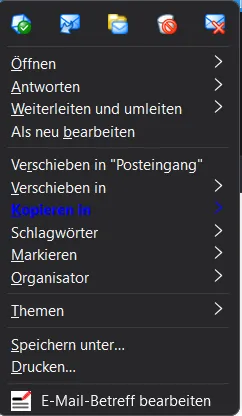

    Falls das ein kompliziertes Vorgehen ist, lass ich es , so wie es ist.:)


    Oben die Symbole im Kontextmenü reichen ja und sind doch neu, oder spinne ich schon..:)

    Edited 3 times, last by Bishop (August 14, 2024 at 3:13 PM).

  • graba August 14, 2024 at 2:30 PM

    Moved the thread from forum Erweiterungen to forum Manuelle Anpassungen per CSS oder Script.
  • Bishop
    Member
    Reactions Received
    1
    Posts
    23
    Member since
    5. Jul. 2021
    • August 14, 2024 at 5:40 PM
    • #2

    Hallo,

    habe mal bei Win10 nachgeschaut, da ist das Update noch nicht erfolgt, hier das alte Kontextmenü, von daher ist meine Frage schon beantwortet. Ist doch schön mit den neuen Icons im Kontextmenü.

    für mich damit gelöst

    Images

    • Altes Kontextmenü.png
      • 16.63 kB
      • 232 × 575
  • Endor
    Member
    Reactions Received
    6
    Posts
    81
    Member since
    2. Apr. 2009
    • August 21, 2024 at 8:17 PM
    • #3

    Löschen ist jetzt ganz oben rechts das Symbol im Kontextmenü.
    Im Menü selber als Eintrag nicht mehr.

    Willst Du da alle farbig haben, und überall andere Farbe?
    Wenn ja, Deinen aktuellen CSS Code - Voodoo mal hier einstellen.
    Mfg.
    Endor

    Thunderbird 129 - Thunderbird Beta - Thunderbird Daily
    Scriptesammlung: ➜ https://github.com/Endor8/userChr…ter/Thunderbird

    Kein Support per PN. Fragen bitte im Forum stellen!

  • dharkness21
    Senior Member
    Reactions Received
    489
    Posts
    2,030
    Member since
    29. Jun. 2005
    Helpful answers
    55
    • August 21, 2024 at 10:51 PM
    • #4
    Quote from Endor

    Willst Du da alle farbig haben, und überall andere Farbe?

    Für einige Punkte sähe das CSS so ↓ aus, fehlt z.Z. nur noch die Anpassung für [_moz-menuactive="true"].

    CSS
    #navContext-reply.menuitem-iconic {
        appearance: none !important;
        background-color: #0082FC !important;
        color: #FFF !important;
    }
    #navContext-delete.menuitem-iconic {
        appearance: none !important;
        background-color: #F20 !important;
        color: #FFF !important;
    }
    #mailContext-copyMenu {
        appearance: none !important;
        background-color: #0082FC !important;
        color: #FFF !important;
    }
    #navContext-delete.menuitem-iconic:hover,
    #navContext-reply.menuitem-iconic:hover,
    #mailContext-copyMenu:hover {
        background-color: #D1E2F2 !important;
        color: #000 !important;
    }
    Display More

    und wech

    Dharkness

  • Community-Bot August 22, 2025 at 4:31 AM

    Closed the thread.

Current app version

  • Thunderbird 152.0.1 veröffentlicht

    Thunder July 4, 2026 at 1:02 PM

Current 140 ESR version

  • Thunderbird 140.12.1 ESR veröffentlicht

    Thunder July 4, 2026 at 1:05 PM

No Advertisements

There are no advertisements here. Maybe you give the website owner (Alexander Ihrig - aka "Thunder") instead something to be able to finance these sites in the long run. Many Thanks!

Thank you for the support!

Coffee to be spent?

Donate now via Paypal*

*Forwarding to PayPal.Me

Thunderbird Mail DE
  1. Imprint & Contact
  2. Privacy Policy
    1. Cookie Policy
  3. Terms of Use
  4. Donation Call for Thunderbird
Help for this website
  • All website support articles
  • How to use website search
  • How to create a forums user account
  • How to create and edit a forums thread
  • How to reset your forums password
Copyright © 2003-2026 Thunderbird Mail DE

You are NOT on an official page of the Mozilla Foundation. Mozilla®, mozilla.org®, Firefox®, Thunderbird™, Bugzilla™, Sunbird®, Seamonkey®, XUL™ and the Thunderbird logo are (among others) registered trademarks of the Mozilla Foundation.

Powered by WoltLab Suite™