1. Home
  2. News
  3. Download
    1. Thunderbird Release Version
    2. Thunderbird 140 ESR
    3. Thunderbird 128 ESR
    4. Thunderbird 115 ESR
    5. Thunderbird Beta Version
    6. Language Pack (User Interface)
    7. Dictionaries (Spell Check)
  4. Help & Lexicon
    1. Instructions for Thunderbird
    2. Questions & Answers (FAQ) about Thunderbird
    3. Help for this Website
    4. Last Changes
  5. Forums
    1. Unresolved Threads
    2. Latest Posts
    3. Threads of the last 24 hours
  • Login
  • Register
  • 
  • Search
This Thread
  • Everywhere
  • This Thread
  • This Forum
  • Forum
  • Lexicon
  • Articles
  • Pages
  • More Options
  1. Thunderbird Mail DE
  2. Forum
  3. Hilfe zu Add-ons und manuellen Anpassungen
  4. Erweiterungen

Attachments deleted, but usage number did not change.

  • loophole64
  • February 12, 2020 at 1:59 AM
  • Closed
  • Thread is Unresolved
  • loophole64
    Junior Member
    Posts
    2
    Member since
    30. Jan. 2020
    • February 12, 2020 at 1:59 AM
    • #1

    Please, give the following information:

    • Thunderbird version: 68.4.1
    • Operating system + version: Windows 10
    • Version of the add-on: 2.0.6

    I was using 98% of my gmail space, so I used the add-on to download about 3.5 GB of attachments and then once I verified they were good, I used the "Just delete attachments from selected messages" function. Gmail now shows these attachments prefaced with "deleted" and they appear to only take up 1kb of space, but Gmail still shows me using 98% of my 15 GB. Somehow it is still counting the original size of the attachments. Help?

  • graba February 12, 2020 at 5:33 AM

    Approved the thread.
  • Mapenzi
    Senior Member
    Reactions Received
    1,067
    Posts
    12,374
    Member since
    26. May. 2012
    Helpful answers
    128
    • February 12, 2020 at 9:54 AM
    • #2

    Did you compact the folders of your GMail accounts after deleting the attachments?

    I guess this would mainly concern the "Inbox" and "Sent" folders.

    http://kb.mozillazine.org/Thunderbird_:_…pacting_Folders

  • loophole64
    Junior Member
    Posts
    2
    Member since
    30. Jan. 2020
    • February 12, 2020 at 9:57 PM
    • #3

    Compacting folders frees up space locally, it doesn't do anything to the gmail server. I can view the messages in the Gmail web interface and they show they are only 1 kb in size now, where they used to be around 3 - 7 MB (mp3 files). But gmail says I am still nearly at capacity (14.88 of 15 GB used).

  • Thunder
    Administrator
    Reactions Received
    777
    Posts
    7,306
    entries
    169
    Member since
    8. Jul. 2003
    Helpful answers
    58
    • February 12, 2020 at 10:39 PM
    • #4
    Quote from loophole64

    Compacting folders frees up space locally, it doesn't do anything to the gmail server.

    Unfortunately, Gmail may be special.

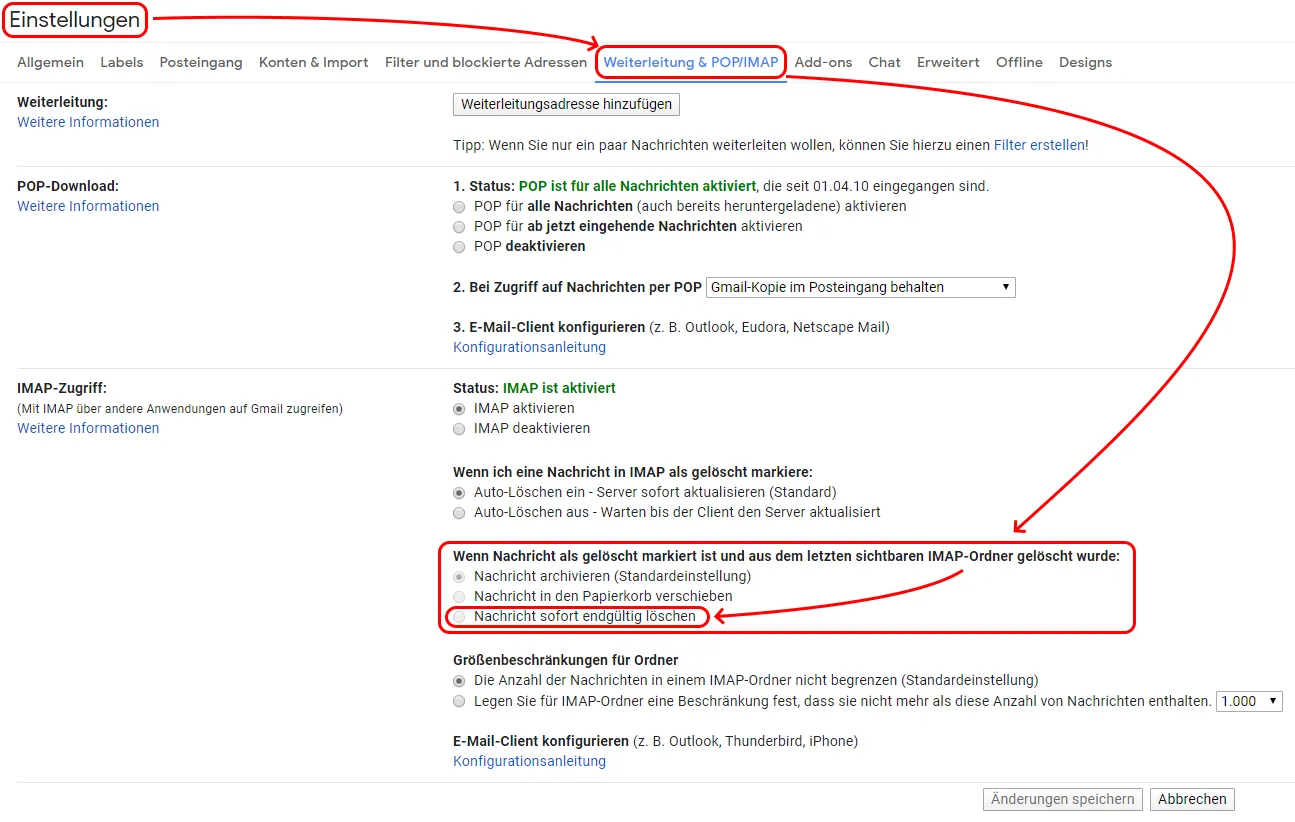
    Technically deleting attachments creates a duplicate message without the attachments and the original message is then deleted. However, Gmail may keep every message in its archive (see Gmail settings on their website). I am currently unsure about the behavior.

    Gruß
    Thunder ( Mein persönlicher Wunschzettel )

    Keine Hilfe per Konversation! - Danke für Euer Engagement und Eure Geduld!

  • Thunder
    Administrator
    Reactions Received
    777
    Posts
    7,306
    entries
    169
    Member since
    8. Jul. 2003
    Helpful answers
    58
    • February 12, 2020 at 10:47 PM
    • #5

    This could be the necessary options change in Gmail:

    Gruß
    Thunder ( Mein persönlicher Wunschzettel )

    Keine Hilfe per Konversation! - Danke für Euer Engagement und Eure Geduld!

  • Thunder December 6, 2023 at 11:06 PM

    Moved the thread from forum AttachmentExtractor Continued to forum Erweiterungen.
  • Community-Bot September 3, 2024 at 8:40 PM

    Closed the thread.

Current app version

  • Thunderbird 149.0.2 veröffentlicht

    Thunder April 7, 2026 at 9:15 PM

Current 140 ESR version

  • Thunderbird 140.9.1 ESR veröffentlicht

    Thunder April 7, 2026 at 9:11 PM

No Advertisements

There are no advertisements here. Maybe you give the website owner (Alexander Ihrig - aka "Thunder") instead something to be able to finance these sites in the long run. Many Thanks!

Thank you for the support!

Coffee to be spent?

Donate now via Paypal*

*Forwarding to PayPal.Me

Thunderbird Mail DE
  1. Imprint & Contact
  2. Privacy Policy
    1. Cookie Policy
  3. Terms of Use
  4. Donation Call for Thunderbird
Help for this website
  • All website support articles
  • How to use website search
  • How to create a forums user account
  • How to create and edit a forums thread
  • How to reset your forums password
Copyright © 2003-2026 Thunderbird Mail DE

You are NOT on an official page of the Mozilla Foundation. Mozilla®, mozilla.org®, Firefox®, Thunderbird™, Bugzilla™, Sunbird®, Seamonkey®, XUL™ and the Thunderbird logo are (among others) registered trademarks of the Mozilla Foundation.

Powered by WoltLab Suite™