1. Home
  2. News
  3. Download
    1. Thunderbird Release Version
    2. Thunderbird 140 ESR
    3. Thunderbird 115 ESR
    4. Thunderbird Beta Version
    5. Language Pack (User Interface)
    6. Dictionaries (Spell Check)
  4. Help & Lexicon
    1. Instructions for Thunderbird
    2. Questions & Answers (FAQ) about Thunderbird
    3. Help for this Website
    4. Last Changes
  5. Forums
    1. Unresolved Threads
    2. Latest Posts
    3. Threads of the last 24 hours
  • Login
  • Register
  • 
  • Search
This Thread
  • Everywhere
  • This Thread
  • This Forum
  • Forum
  • Lexicon
  • Articles
  • Pages
  • More Options
  1. Thunderbird Mail DE
  2. Forum
  3. Hilfe zu E-Mail und allgemeines Arbeiten
  4. Migration / Import / Backups

Empty mailboxes after profile & mail transfer to another computer

    • 115 ESR
    • Linux
  • vedat
  • July 12, 2024 at 2:11 PM
  • Closed
  • Thread is Resolved
  • vedat
    Member
    Reactions Received
    1
    Posts
    5
    Member since
    12. Jul. 2024
    • July 12, 2024 at 2:11 PM
    • #1

    I have two computers (PC1, PC2) with Linux Mint 21.2. On PC1 I am using a Thunderbird installation (currently version 115.12.0 from official repositories) with multiple IMAP and POP accounts since several years. The mails are stored separately from $HOME/.thunderbird:

    $HOME/bla/blub/ImapMail, and
    $HOME/bla/blub/Mail

    These paths are specified as local directories in the server settings of each account which works fine on PC1. Specifically, an IMAP account (that is deactivated, but the mails are still kept) is shown like this
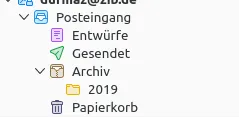
    and another POP mail account like this:
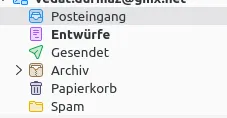
    The source directory of the IMAP account ($HOME/bla/blub/ImapMail/imap.bla.de) looks as follows:

    filterlog.html           198  2019-11-29
    msgFilterRules.dat        25  2018-09-16
    nstmp                2359296  2018-12-13
    INBOX              695687544  2023-02-08
    INBOX.msf           14033997  2024-07-09
    INBOX.sbd               4096  2023-02-08
       Archives.msf         2755  2019-06-23
       Archives.sbd         4096  2019-06-21
       Drafts             218913  2020-04-01
       Drafts.msf          15559  2024-07-06
       Junk.msf                0  2018-09-16
       Sent            179646198  2020-04-01
       Sent.msf          3571726  2024-07-06
       Templates.msf           0  2018-09-16
       Trash.msf            2928  2023-02-08


    Now I'm trying to clone this setup to PC2 by following these steps:

    - Thunderbird installation on PC2
    - Copying $HOME/.thunderbird from PC1 to PC2
    - Copying $HOME/bla/blub from PC1 to $HOME/bla/blub on PC2
    - Starting Thunderbird on PC2

    While expecting the same result as shown above for the source computer, I encounter two issues:

    1. Right after installation, the emails of the IMAP account are not shown in TB because only one field "Posteingang" (= inbox) is depicted
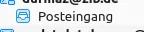
    the mailbox in the right hand window of TB appears to be absolutely empty.

    2. After a few days including 1 or 2 system reboots, now the POP account suddenly seems to be empty, although it was showing the mails right after TB installation:
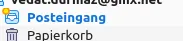
    Only Trash and Inbox are listed but empty, so all emails are downloaded once again. But unfortunately the mails of the earliest years are not available on the mail server anymore, so those mails are missing and only available in my TB installation of PC1 (which I therefore want to transfer to PC2).

    What am I doing wrong? Can someone please give me some hints on how to achieve a cloning of everything onto a new machine? Many thanks in advance!


  • graba July 12, 2024 at 3:42 PM

    Approved the thread.
  • ggbsde
    Senior Member
    Reactions Received
    822
    Posts
    3,258
    Member since
    3. Nov. 2023
    Helpful answers
    64
    • July 12, 2024 at 5:38 PM
    • #2

    The cloaning seems to be correct. For the IMAP accounts you probably have to subscribe (Abonnieren) to the subfolders and/or deselct 'show only subscribed folders' in the advanced account settings.

  • Drachen
    Senior Member
    Reactions Received
    2,075
    Posts
    5,435
    Member since
    15. Nov. 2004
    Helpful answers
    44
    • July 12, 2024 at 6:22 PM
    • #3

    ... OT: der Satzbau der ersten Anfrage in Kombination mit den Screenshots lässt mich vermuten, dass vedat auch im deutschen Sprachraum beheimatet ist ...

  • vedat
    Member
    Reactions Received
    1
    Posts
    5
    Member since
    12. Jul. 2024
    • July 22, 2024 at 2:33 PM
    • #4
    Quote from Drachen

    ... OT: der Satzbau der ersten Anfrage in Kombination mit den Screenshots lässt mich vermuten, dass vedat auch im deutschen Sprachraum beheimatet ist ...

    Ist er in der Tat. Bitte um Verzeihung für die sprachliche Ver(w)irrung sowie meine verspätete Antwort; befinde mich derzeit auf Reisen jenseits des eisernen Vorhangs ...

    Quote from ggbsde

    The cloaning seems to be correct. For the IMAP accounts you probably have to subscribe (Abonnieren) to the subfolders and/or deselct 'show only subscribed folders' in the advanced account settings.

    Ein Feld Erweitert sehe ich bspw. in den Servereinstellungen des besagten IMAP Kontos. Dort kann ich tatsächlich den Haken bei Nur abbonierte Ordner anzeigen entfernen. Doch nach einem TB Neustart ist alles wie gehabt (keine Emails im Posteingang), was mich nicht wundert, da die Emails bereits verschwunden waren.

    Wie ist der Hinweis zu verstehen? Also erneut den Profilordner bzw. das ImapMail Verzeichnis von PC1 auf PC2 kopieren, dann TB starten und schauen? In der Zwischenzeit hat sich womöglich einiges im .profile Verzeichnis verändert. Also villeicht doch beide Verzeichnisse erneut übertragen, dann zügig TB starten, den Haken ernfernen, TB neustarten, usw.?

    Danke jedenfalls schon mal für die Hilfe!

  • vedat
    Member
    Reactions Received
    1
    Posts
    5
    Member since
    12. Jul. 2024
    • July 22, 2024 at 3:07 PM
    • #5

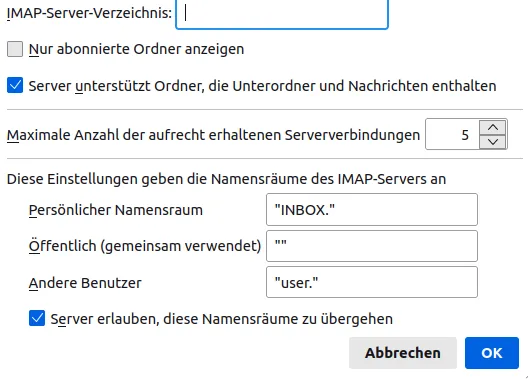
    Ich habe jetzt folgendes versucht: In TB für das (wohlgemerkt serverseitig deaktivierte) Konto den Haken bei Nur abonnierte Ordner anzeigen entfernt und OK:

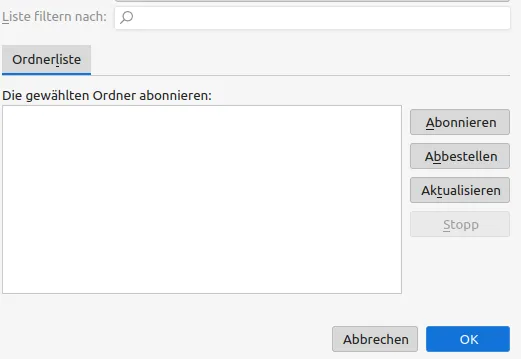
    Mit Rechtsklick>Abbonieren öffnet sich dieses Fenster, da lässt sich aber nichts auswählen, vermutlich weil das Konto deaktiviert ist.

    Dann TB geschlossen und von PC1 die 1.2 kB große Datei imap.bla.de.msf sowie den Ordner imap.bla.de (enthält die ca. 700 MB große INBOX Datei und eine 14 MB große INBOX.msf Datei) in das ImapMail Verzeichnis von PC2 kopiert.

    Im Anschluss TB gestartet und wie gehabt einen leeren Posteingang vorgefunden. Im Ordner imap.bla.de ist die große Datei INBOX verschwunden, die 14 MB große INBOX.msf Datei ist zwar erhalten geblieben, doch eine bzw. inzwischen zwei neue Dateien INBOX-1.msf und INBOX-2.msf wurden erzeugt.

    Aus irgendeinem Grund mag TB die 700 MB INBOX Datei nicht annehmen ...

  • vedat
    Member
    Reactions Received
    1
    Posts
    5
    Member since
    12. Jul. 2024
    • July 22, 2024 at 10:05 PM
    • #6

    OK, das Problem hat sich erledigt, nachdem ich auf dieser Seite eine Lösung fand. Sämtliche Emails aller Konten sind wieder da.

    Ich hatte nämlich nicht den gesamten .thunderbird Ordner sondern lediglich das profile Unterverzeichnis kopiert. Muss also erneut um Verzeihung bitten.

    Nichtsdestotrotz danke für Zeit & Hilfestellung!

  • Drachen
    Senior Member
    Reactions Received
    2,075
    Posts
    5,435
    Member since
    15. Nov. 2004
    Helpful answers
    44
    • July 23, 2024 at 9:12 AM
    • #7

    danke für die Rückmeldung, woran es letztlich lag :-)

  • Community-Bot July 24, 2025 at 4:31 AM

    Closed the thread.

Current app version

  • Thunderbird 152.0.1 veröffentlicht

    Thunder July 4, 2026 at 1:02 PM

Current 140 ESR version

  • Thunderbird 140.12.1 ESR veröffentlicht

    Thunder July 4, 2026 at 1:05 PM

No Advertisements

There are no advertisements here. Maybe you give the website owner (Alexander Ihrig - aka "Thunder") instead something to be able to finance these sites in the long run. Many Thanks!

Thank you for the support!

Coffee to be spent?

Donate now via Paypal*

*Forwarding to PayPal.Me

Thunderbird Mail DE
  1. Imprint & Contact
  2. Privacy Policy
    1. Cookie Policy
  3. Terms of Use
  4. Donation Call for Thunderbird
Help for this website
  • All website support articles
  • How to use website search
  • How to create a forums user account
  • How to create and edit a forums thread
  • How to reset your forums password
Copyright © 2003-2026 Thunderbird Mail DE

You are NOT on an official page of the Mozilla Foundation. Mozilla®, mozilla.org®, Firefox®, Thunderbird™, Bugzilla™, Sunbird®, Seamonkey®, XUL™ and the Thunderbird logo are (among others) registered trademarks of the Mozilla Foundation.

Powered by WoltLab Suite™