1. Home
  2. News
  3. Download
    1. Thunderbird Release Version
    2. Thunderbird 140 ESR
    3. Thunderbird 115 ESR
    4. Thunderbird Beta Version
    5. Language Pack (User Interface)
    6. Dictionaries (Spell Check)
  4. Help & Lexicon
    1. Instructions for Thunderbird
    2. Questions & Answers (FAQ) about Thunderbird
    3. Help for this Website
    4. Last Changes
  5. Forums
    1. Unresolved Threads
    2. Latest Posts
    3. Threads of the last 24 hours
  • Login
  • Register
  • 
  • Search
This Thread
  • Everywhere
  • This Thread
  • This Forum
  • Forum
  • Lexicon
  • Articles
  • Pages
  • More Options
  1. Thunderbird Mail DE
  2. Forum
  3. Hilfe zu Add-ons und manuellen Anpassungen
  4. Manuelle Anpassungen per CSS oder Script

in Toolbar Button einzelnt ändern ?

    • 115 ESR
    • Windows
  • Tapo
  • September 10, 2023 at 4:40 PM
  • Closed
  • Thread is Resolved
  • Tapo
    Senior Member
    Reactions Received
    8
    Posts
    544
    Member since
    25. Aug. 2014
    Helpful answer
    1
    • September 10, 2023 at 4:40 PM
    • #1

    Hallo,

    ich möchte in meiner Toolbar die buttons für Abrufen, Verfassen, Adressbuch je einzelnt ändern.

    hiermit werden komplett alle buttons geändert die in der Toolbar sind

    Code
    .button.toolbar-button[open="true"],
    .button.toolbar-button:not([disabled="true"]):hover,
    .button.unified-toolbar-button:enabled:is([aria-pressed="true"], :hover) {
      color: var(--button-hover-text-color);
      background-color: var(--toolbar-button-hover-background-color);
      border-color: var(--toolbar-button-hover-border-color);
    }

    genau das selbe möchte ich aber für jeden einzelnen Buttonhaben damit ich z.B Abrufen Rot, verfassen in Grüm und Adressbuch in Pink bekomme.
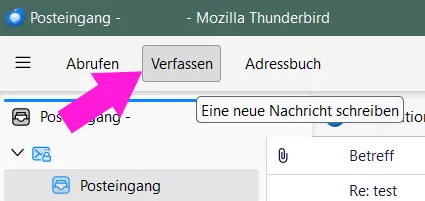
    wie mach ich das ohne den button zu vergrößern oder sonst in der Form zu ändern

  • dharkness21
    Senior Member
    Reactions Received
    489
    Posts
    2,030
    Member since
    29. Jun. 2005
    Helpful answers
    55
    • September 10, 2023 at 4:52 PM
    • Best Answer
    • #2
    Quote from Tapo

    genau das selbe möchte ich aber für jeden einzelnen Buttonhaben damit ich z.B Abrufen Rot, verfassen in Grüm und Adressbuch in Pink bekomme.

    Teste bitte mal die anzupassende Rohversion, sprich die Farben musst Du noch anpssen.

    CSS
    /* Adressbuch */
    #unifiedToolbarContent > li.address-book > div > button {
        background-color: #905B46 !important;
        color: #FFF !important;
    }
    /* Abrufen */
    #unifiedToolbarContent > li.get-messages > div > button {
        background-color: #905B46 !important;
        color: #FFF !important;
    }
    /* Verfassen */
    #unifiedToolbarContent > li.write-message > div > button {
        background-color: #905B46 !important;
        color: #FFF !important;
    }
    Display More

    und wech

    Dharkness

  • Tapo
    Senior Member
    Reactions Received
    8
    Posts
    544
    Member since
    25. Aug. 2014
    Helpful answer
    1
    • September 10, 2023 at 6:50 PM
    • #3

    passt für mich.

    anpassen der Farbe ist klar.

    Danke

  • Tapo September 10, 2023 at 6:50 PM

    Selected a post as the best answer.
  • dharkness21
    Senior Member
    Reactions Received
    489
    Posts
    2,030
    Member since
    29. Jun. 2005
    Helpful answers
    55
    • September 10, 2023 at 7:10 PM
    • #4
    Quote from Tapo

    passt für mich.

    War wie immer gerne geschehen. :)

    und wech

    Dharkness

  • Thomas will lernen
    Member
    Posts
    28
    Member since
    31. Mar. 2024
    • April 3, 2024 at 1:26 PM
    • #5

    Wie kann man über die Farbe hinaus auch den Text des Buttons ändern?

    Mein Ergebnis ist noch nicht optimal, weil der Button-Hintergrund beim Hovern nun viel kleiner ist, als beim unveränderten Button. Hier mein Versuch (gebastelt vor allem aus ChaosRacer's Lösung in einem anderen Thread):

    CSS
    .unified-toolbar .go-back .button-icon {
     color: black !important;
     position: absolute !important;
    }
    #unifiedToolbarContent > li.go-back > div > button {
     appearance: none !important;
     background-image: none !important;
     color: transparent !important;
     position: relative !important;
    }
    /* --- Content ersetzen, positionieren & einblenden --- */
    #unifiedToolbarContent > li.go-back > div > button::after {
     appearance: none !important;
     content: 'Back' !important;
     color: #6b6b6b !important;
     position: absolute !important;
     left: 8px !important;
     right: -10px !important;
     padding: -10px !important;
    }
    #unifiedToolbarContent > li.go-back > div > button:hover::after {
     background-color: rgba(54, 54, 54, 0.1) !important;
    }
    /* --- Buttongröße an Content anpassen --- */
    #unifiedToolbarContent > li.go-back > div > button {
     appearance: none !important;
     padding-inline-start: unset !important;
     padding-inline-end:  unset !important;
    }
    Display More
  • dharkness21
    Senior Member
    Reactions Received
    489
    Posts
    2,030
    Member since
    29. Jun. 2005
    Helpful answers
    55
    • April 3, 2024 at 7:59 PM
    • #6
    Quote from Thomas will lernen

    Wie kann man über die Farbe hinaus auch den Text des Buttons ändern?

    Mein Ergebnis ist noch nicht optimal, weil der Button-Hintergrund beim Hovern nun viel kleiner ist, als beim unveränderten Button. Hier mein Versuch (gebastelt vor allem aus ChaosRacer's Lösung in einem anderen Thread):

    Meine Lösung für den Button war mal das ↓ CSS.

    CSS
    .unified-toolbar .go-back .button-icon {
        position: absolute !important;
        color: #FFF !important;
    }
    .unified-toolbar .go-back:hover .button-icon {
        color: #000 !important;
    }
    #unifiedToolbarContent > li.go-back > div > button {
        appearance: none !important;
        position: relative !important;
        transition: none !important;
        min-width: 44px !important;
        background-image: none !important;
        color: transparent !important;
    }
    #unifiedToolbarContent > li.go-back > div > button:hover {
        transition: none !important;
        background-color: #D1E2F2 !important;
        color: transparent !important;
    }
    #unifiedToolbarContent > li.go-back > div > button::after {
        appearance: none !important;
        position: absolute !important;
        transition: none !important;
        content: 'Back' !important;
        color: #FFF !important;
        left: 15px !important;
        right: 8px !important;
        padding: 0 !important;
    }
    #unifiedToolbarContent > li.go-back > div > button:hover::after {
        transition: none !important;
        background-color: #D1E2F2 !important;
        color: #000 !important;
    }
    #unifiedToolbarContent > li.go-back > div > button {
        appearance: none !important;
        padding-inline-start: unset !important;
        padding-inline-end:  unset !important;
    }
    Display More

    und wech

    Dharkness

  • Thomas will lernen
    Member
    Posts
    28
    Member since
    31. Mar. 2024
    • April 4, 2024 at 10:15 AM
    • #7

    Ah, wunderbar! Danke Dharkness!

    Ich habe noch eine "border-color" hinzugefügt, die die Originale auch haben. Jetzt sehen die Buttons wirklich komplett identisch aus. Phuhh! Mann hey, was ein Akt, nur um den Button-Text zu ändern. :-D

    Danke nochmal!

    CSS
    #unifiedToolbarContent > li.go-back > div > button:hover {
        transition: none !important;
        background-color: #e6e6e6 !important;
        color: transparent !important;
        border-color: #c2c2c2 !important;
    }
  • Community-Bot April 5, 2025 at 4:30 AM

    Closed the thread.

Current app version

  • Thunderbird 152.0.1 veröffentlicht

    Thunder July 4, 2026 at 1:02 PM

Current 140 ESR version

  • Thunderbird 140.12.1 ESR veröffentlicht

    Thunder July 4, 2026 at 1:05 PM

No Advertisements

There are no advertisements here. Maybe you give the website owner (Alexander Ihrig - aka "Thunder") instead something to be able to finance these sites in the long run. Many Thanks!

Thank you for the support!

Coffee to be spent?

Donate now via Paypal*

*Forwarding to PayPal.Me

Similar Threads

  • Symbole in der Unified Toolbar färben

    • Alphatier
    • August 23, 2023 at 10:51 PM
    • Manuelle Anpassungen per CSS oder Script
  • Button per Script aus FolderPane in UnifiedToolbar umhängen (cross-document)

    • FrankSteiner
    • August 18, 2023 at 11:18 AM
    • Manuelle Anpassungen per CSS oder Script
  • toolbar button mit css anpassen ?

    • Tapo
    • January 29, 2022 at 12:50 AM
    • Manuelle Anpassungen per CSS oder Script
  • CSS-Code der Schließen-Button v91.+

    • nowar
    • April 8, 2022 at 8:36 AM
    • Manuelle Anpassungen per CSS oder Script
  • Button Anordnung in der Nachrichtenansicht ändern möglich?

    • sdw934jy92a
    • February 1, 2022 at 9:26 PM
    • Allgemeines Arbeiten / Konten einrichten / Installation & Update
Thunderbird Mail DE
  1. Imprint & Contact
  2. Privacy Policy
    1. Cookie Policy
  3. Terms of Use
  4. Donation Call for Thunderbird
Help for this website
  • All website support articles
  • How to use website search
  • How to create a forums user account
  • How to create and edit a forums thread
  • How to reset your forums password
Copyright © 2003-2026 Thunderbird Mail DE

You are NOT on an official page of the Mozilla Foundation. Mozilla®, mozilla.org®, Firefox®, Thunderbird™, Bugzilla™, Sunbird®, Seamonkey®, XUL™ and the Thunderbird logo are (among others) registered trademarks of the Mozilla Foundation.

Powered by WoltLab Suite™
