Hallo,
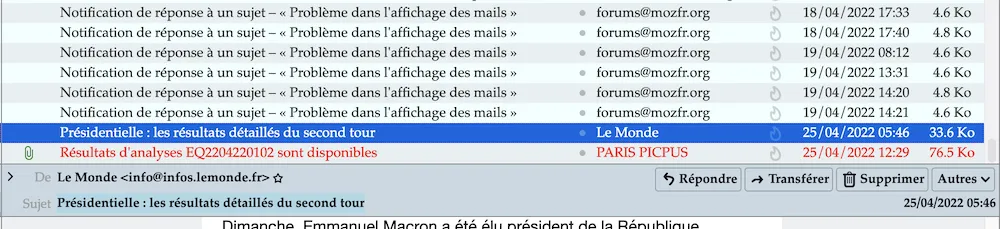
ich benutze das thunderbird emailprogramm Version 91.8.1. Wie kann ich den Posteingangsordner so gestalten, daß jedes email immer abwechselnd farblich unterlegt ist ?

Hallo,
ich benutze das thunderbird emailprogramm Version 91.8.1. Wie kann ich den Posteingangsordner so gestalten, daß jedes email immer abwechselnd farblich unterlegt ist ?

Hallo und willkommen im Forum.
daß jedes email immer abwechselnd farblich unterlegt ist ?
Teste mal das * in der userChrome.css, selbige ist im Profil im anzulegenden Ordner chrome anzulegen.
*
treechildren::-moz-tree-row {
    appearance: none !important;
    background-color: #4f555b !important;
}
treechildren::-moz-tree-row(odd) {
    appearance: none !important;
    background-color: #363a3e !important;
}
Zusätzlich muss unten in den Einstellungen bei Allgemein in Konfiguration bearbeiten… die ** Pref per Doppelklick auf true gestellt werden und Tb neu gestartet werden.
**
toolkit.legacyUserProfileCustomizations.stylesheets
Wie kann ich den Posteingangsordner so gestalten, daß jedes email immer abwechselnd farblich unterlegt ist ?
/* Set preference toolkit.legacyUserProfileCustomizations.stylesheets to true !! */


/* colour for even numbered rows */
treechildren::-moz-tree-row(even) {
background-image: linear-gradient(rgba(0,0,0,.08), rgba(0,0,0,.08)) !important;  /* Highlight, complication for tagged rows */
}


/* previously selected item, now deselected */
treechildren::-moz-tree-row(untagged, selected) {
border: none !important;  /* needed so suppress 'native' selection border */
background-image: linear-gradient(#c0d0ff, #c0d0ff) !important;  /* Highlight, complication for tagged rows */
}


treechildren::-moz-tree-row(untagged, selected, focus) {
/* Original TB colour cde8ff + three steps darker in GIMP. */
background-image: linear-gradient(#c4dff6, #c4dff6) !important;  /* Highlight, complication for tagged rows */
}


treechildren::-moz-tree-row(untagged, hover) {
/* Original TB colour cde8ff + four steps lighter in GIMP. */
background-image: linear-gradient(#d8f3ff, #d8f3ff) !important;  /* very pale blue, complication for tagged rows */
}


treechildren::-moz-tree-row(untagged, selected, focus, hover) {
/* Original TB colour cde8ff. */
background-image: linear-gradient(#cde8ff, #cde8ff) !important;  /* Highlight, but lighter, complication for tagged rows */
}


treechildren::-moz-tree-cell(dropOn) {
background-image: none !important;     /* needed so target background is solid */
background-color: #ff8080 !important;
}


.autocomplete-richlistitem:hover {
background-color: #ff8080 !important;
}


#threadTree[filterActive="searching"] {
background-color: #ffffcc !important;
}


#threadTree[filterActive="matches"] {
background-color: #f0ffff ! important;
}


#threadTree[filterActive="nomatches"] {
background: repeating-linear-gradient(-45deg, #fff0f4,
#fff0f4 5px, white 5px, white 10px) !important;
}


#folderTree {
--primary: #196f3d !important;
}


treechildren::-moz-tree-row(multiline, unread) {
border-left: 3px solid #0080C0 !important;
background-color: rgba(0, 128, 192, 0.1) !important;
}
Danke für eure mithilfe,
aber ehrlich gesagt verstehe ich nur Bahnhof. Wo finde ich das CSS bzw. userChrome ?
Wo finde ich das CSS bzw. userChrome ?
Guckst Du da → #Benutzeroberfläche per userChrome.css anpassen.
Als Alternative zu den vorigen Code möchte ich folgenden CSS-Code für die Zebra-Streifung in der Nachrichten/Themenliste vorstellen. Der Code ist übrigens nicht nur für den Posteingang gültig, sondern für alle Ordner.
/* ::: Alternating row colors in thread pane ::: */

#threadTree treechildren::-moz-tree-row(multicol, odd, untagged) {
  background-color: azure !important; }

#threadTree treechildren::-moz-tree-row(untagged, selected) {
background-color: #c0d0ff !important; }

#threadTree treechildren::-moz-tree-row(untagged, selected, focus) {
background-color: Highlight !important; }

#threadTree treechildren::-moz-tree-row(selected, current, focus) {
 border: 1.2px dotted blue !important; }

#threadTree treechildren::-moz-tree-row(selected) {
border: 1.2px dotted blue !important; }

#threadTree treechildren {
background-color: #e6eff1 !important; }Das sieht dann hier unter macOS so aus