1. Home
  2. News
  3. Download
    1. Thunderbird Release Version
    2. Thunderbird 140 ESR
    3. Thunderbird 128 ESR
    4. Thunderbird 115 ESR
    5. Thunderbird Beta Version
    6. Language Pack (User Interface)
    7. Dictionaries (Spell Check)
  4. Help & Lexicon
    1. Instructions for Thunderbird
    2. Questions & Answers (FAQ) about Thunderbird
    3. Help for this Website
  5. Forums
    1. Unresolved Threads
    2. Latest Posts
    3. Threads of the last 24 hours
  • Login
  • Register
  • 
  • Search
This Thread
  • Everywhere
  • This Thread
  • This Forum
  • Forum
  • Lexicon
  • Articles
  • Pages
  • More Options
  1. Thunderbird Mail DE
  2. Forum
  3. Hilfe zu Add-ons und manuellen Anpassungen
  4. Manuelle Anpassungen per CSS oder Script

Schriftgröße in der Nachrichtenliste im TB 115.0

    • 115 ESR
    • Windows
  • MSFreak
  • June 11, 2023 at 2:19 PM
  • Closed
  • Thread is Resolved
  • MSFreak
    Senior Member
    Reactions Received
    1,119
    Posts
    4,012
    Member since
    23. Oct. 2019
    Helpful answers
    83
    • June 11, 2023 at 2:19 PM
    • #1

    Moin liebe Kollegen,

    der Threadtitel sagt schon, was ich gerne möchte und benötige Hilfe von euch Spezialisten.

    Mit diesem Code konnte ich die ersten 6 Reihen die Schriftgröße anpassen

    CSS
    /* Schrift Nachrichten-Liste */
    #threadTree-row0,#threadTree-row1,#threadTree-row2,#threadTree-row3,#threadTree-row4,#threadTree-row5
    {
    font-size: 16px !important;
    font-family: Calbri !important; }
    ##threadTree treechildren > treechildren::-moz-tree-row {
    height: 21px !important; }

    Da aber die Listen z.T. 20 Nachrichten und mehr haben, ist es sehr mühsam den Code #threadTree-row zigmal einzufügen, gibt es da vielleicht ne andere Möglichkeit ?

    Vielen Dank im Voraus und einen schönen Restsonntag.

    Gruß Micha

  • Go to Best Answer
  • Mapenzi
    Senior Member
    Reactions Received
    1,081
    Posts
    12,213
    Member since
    26. May. 2012
    Helpful answers
    125
    • June 11, 2023 at 2:25 PM
    • #2

    Bin gerade nicht vorm Computer.

    Gibt es im Menü Ansicht Ei item zum einstellen der Schriftgrösse?

    aus der Metro

  • MSFreak
    Senior Member
    Reactions Received
    1,119
    Posts
    4,012
    Member since
    23. Oct. 2019
    Helpful answers
    83
    • June 11, 2023 at 2:32 PM
    • #3

    Gibt es, aber die Schriftgröße ist dann für den gesamten Thunderbird, also für User mit schlechten Augen.

    Gruß Micha

  • Bastler
    Guest
    • June 11, 2023 at 2:33 PM
    • Best Answer
    • #4
    Quote from MSFreak

    sehr mühsam den Code #threadTree-row zigmal einzufügen, gibt es da vielleicht ne andere Möglichkeit ?

    Hallo,

    folgender Code funktioniert bei mir im Beta 115, passt auch im Daily

    CSS
    /* ---Ordnerbaum anpassen--- */
    .container {
      appearance: none !important;
    height: 20px !important;
    font-family: tahoma !important;
    font-size: 13px !important;
    }
    
    .container:hover {
    background-color: #CAE1FF !important;
    color: black !important;
    opacity: 1 !important;
    }
    
    /* ---Nachrichtenliste Trennlinie unter der Spaltenleiste--- */
    .tree-table-header {
    background-color: #F8F8F8 !important;
    }
    
    /* ---Nachrichtenliste zusaetzliche Trennlinien zu den Spaltenkoepfen--- */
    #subjectColSplitter, #correspondentColSplitter, #dateColSplitter, #sizeColSplitter {
    border-color: #CACACA !important;
    }
    #attachmentColButton, #unreadButtonColHeaderButton, #flaggedColButton {
    border-right: 0.1px solid #CACACA !important;
    }
    .button-column-picker {
    border-left: 0.1px solid #CACACA !important;
    }
    
    /* ---Nachrichtenliste anpassen--- */
    tr[is="thread-row"] {
      appearance: none !important;
    height: 20px !important;
    font-family: tahoma !important;
    font-size: 13px !important;
    }
    
    /* ---Trennlinien in Nachrichten-Liste (statt Zebra)--- */
     tr[is="thread-row"] {
      outline: 0.01px solid #EDEDED !important;
    }
    Display More
  • MSFreak
    Senior Member
    Reactions Received
    1,119
    Posts
    4,012
    Member since
    23. Oct. 2019
    Helpful answers
    83
    • June 11, 2023 at 2:40 PM
    • #5

    @Bastler, vielen lieben Dank :thumbup:

    Gruß Micha

  • MSFreak June 11, 2023 at 2:41 PM

    Selected a post as the best answer.
  • Bastler
    Guest
    • June 11, 2023 at 2:46 PM
    • #6
    Quote from MSFreak

    vielen lieben Dank

    Bitte gern, kleiner Hinweis:

    die zusaetzlichen Trennlinien zu den Spaltenköpfen müssen je nach persönlicher Art / Auswahl entspr. angepasst werden.

    Teilweise haben die keine Trennung oder sind für mich zu blass.

    border-right: sollte für die meisten passen, ausser bei dem letzten rechten Spaltenkopf u.U. border-left: verwenden,

    weil ich dem Button Spaltenauswahl schon border-left: zugeordnet habe, wäre ein border-right: an der Stelle doppelt.

  • MSFreak
    Senior Member
    Reactions Received
    1,119
    Posts
    4,012
    Member since
    23. Oct. 2019
    Helpful answers
    83
    • June 11, 2023 at 3:27 PM
    • #7

    @Bastler

    Habe die Trennlinien entfernt, hätte gerne anstatt das Zebramuster wieder. Bin da am Probieren, beikomme es aber nicht hin :/

    Gruß Micha

    Edited once, last by MSFreak (June 11, 2023 at 3:52 PM).

  • Bastler
    Guest
    • June 11, 2023 at 6:52 PM
    • #8
    Quote from MSFreak

    Bin da am Probieren, beikomme es aber nicht hin

    Geht mir auch so. ;(

  • MSFreak
    Senior Member
    Reactions Received
    1,119
    Posts
    4,012
    Member since
    23. Oct. 2019
    Helpful answers
    83
    • June 11, 2023 at 7:00 PM
    • #9

    @Bastler

    kannst du mir bitte diesbezüglich weiterhelfen ? Dann wäre ich soweit mit der Beta "zufrieden" und konnte bis jetzt Elemente und andere Sachen per CSS-Codes anpassen. Auch wenn ich diese nicht produktiv eingesetzte bin aber immer neugierig auf was Neues

    Quote from Bastler

    Geht mir auch so

    ... habe im Moment keinen Zugriff auf meinem Hostrechner (derzeit nur mit dem Laptop unterwegs), kann dir (euch) morgen aber den CSS-Code posten, der unter TB 102.12.0 nach meinem Wünschen funktioniert.

    Gruß Micha

    Edited once, last by MSFreak (June 11, 2023 at 7:15 PM).

  • dharkness21
    Senior Member
    Reactions Received
    507
    Posts
    2,002
    Member since
    29. Jun. 2005
    Helpful answers
    55
    • June 11, 2023 at 7:28 PM
    • #10

    Hallo MSFreak und @Bastler,

    ich weiß nicht, ob das ↓ unter Tb115.x funktioniert, aber hier erzeugt das das Zebramuster unter Tb116.x.

    CSS
    #threadTree tr {
        background-image: none !important;
        background-color: #0082FC !important;
    }
    #threadTree tr:nth-child(2n) {
        background-image: none !important;
        background-color: #00407c !important;
    }
    #threadTree tr.selected {
        background-image: none !important;
        background-color: #006800 !important;
    }
    #threadTree tr:nth-child(2n).selected {
        background-image: none !important;
        background-color: #006800 !important;
    }
    #threadTree tr:hover,
    #threadTree tr.selected:hover,
    #threadTree tr:nth-child(2n).selected:hover {
        background-image: none !important;
        background-color: #1C1B22 !important;
    }
    Display More

    Also einfach mal hoffen und testen. 8o

    und wech

    Dharkness

  • MSFreak
    Senior Member
    Reactions Received
    1,119
    Posts
    4,012
    Member since
    23. Oct. 2019
    Helpful answers
    83
    • June 11, 2023 at 8:12 PM
    • #11

    dharkness21

    Funktioniert, vielen lieben Dank :thumbup:

    Gruß Micha

    Edited once, last by MSFreak (June 11, 2023 at 8:32 PM).

  • MSFreak June 11, 2023 at 8:32 PM

    Selected a post as the best answer.
  • MSFreak June 11, 2023 at 8:32 PM

    Selected a post as the best answer.
  • dharkness21
    Senior Member
    Reactions Received
    507
    Posts
    2,002
    Member since
    29. Jun. 2005
    Helpful answers
    55
    • June 11, 2023 at 9:13 PM
    • #12
    Quote from MSFreak

    Funktioniert, vielen lieben Dank :thumbup:

    Aber gerne doch. :)

    und wech

    Dharkness

  • Mapenzi
    Senior Member
    Reactions Received
    1,081
    Posts
    12,213
    Member since
    26. May. 2012
    Helpful answers
    125
    • June 12, 2023 at 7:00 PM
    • #13
    Quote from dharkness21

    Also einfach mal hoffen und testen

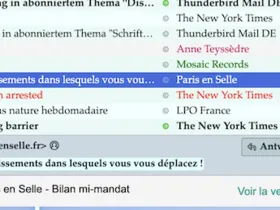
    95% meiner CSS-Code für TB 102.* funktionieren in TB 115 beta nicht mehr, darunter der für eine diskrete Zebrastreifung mit Berücksichtigung der Tag-Farben.

    CSS
    /*  Alternating row colors in thread pane */
    #threadTree treechildren::-moz-tree-row(multicol, odd, untagged) {
      background-color: azure !important; }
    
    #threadTree treechildren { 
    background-color: #e8faf6 !important; }
    
    #threadTree treechildren::-moz-tree-row(selected, untagged) {
      background-color: highlight !important; } 
    
    #threadTree treechildren::-moz-tree-cell-text(untagged, selected, focus) {
      color: white !important; }
    Display More

    Die zusätzlichen CSS-Code für die Tags habe ich hier mal weggelassen.

    Da sieht bei mir so aus

    Ich habe deinen Code hoffnungsvoll getestet, ist mir zu bunt und funktioniert nicht für die Tags.

    Trotzdem danke, denn er hat mich etwas weiter gebracht und ich werde darauf aufbauen "trial & error")

  • MSFreak
    Senior Member
    Reactions Received
    1,119
    Posts
    4,012
    Member since
    23. Oct. 2019
    Helpful answers
    83
    • June 12, 2023 at 7:09 PM
    • #14
    Quote from Mapenzi

    Da sieht bei mir so aus

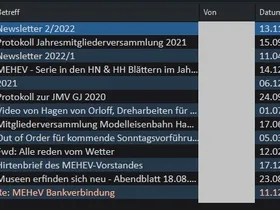
    ... und bei mir unter Windows so:

    Gruß Micha

  • Mapenzi
    Senior Member
    Reactions Received
    1,081
    Posts
    12,213
    Member since
    26. May. 2012
    Helpful answers
    125
    • June 12, 2023 at 7:26 PM
    • #15
    Quote from MSFreak

    .. und bei mir unter Windows so:

    Ist das deine eigener "Zebra" Code oder der von dharkness21?

  • MSFreak
    Senior Member
    Reactions Received
    1,119
    Posts
    4,012
    Member since
    23. Oct. 2019
    Helpful answers
    83
    • June 12, 2023 at 7:33 PM
    • #16
    Quote from Mapenzi

    Ist das deine eigener "Zebra" Code oder der von dharkness21?

    ... abgewandelt, mit der Theme "Dark Night Arcturus X" und dem von mir angepassten CSS-Code von dharkness21

    CSS
    /* Farbe "Zebramuster" Nachrichten-Liste */
    #threadTree tr {
    background-image: none !important;
    background-color: #25384A !important;}
    #threadTree tr:nth-child(2n) {
    background-image: none !important;
    background-color: #18181B !important;}
    #threadTree tr.selected {
    background-image: none !important;
    background-color: #264765 !important;}
    #threadTree tr:nth-child(2n).selected {
    background-image: none !important;
    background-color: #264765 !important;}
    #threadTree tr:hover,
    #threadTree tr.selected:hover,
    #threadTree tr:nth-child(2n).selected:hover {
    background-image: none !important;
    background-color: #275C91 !important;}
    Display More

    Gruß Micha

  • Mapenzi
    Senior Member
    Reactions Received
    1,081
    Posts
    12,213
    Member since
    26. May. 2012
    Helpful answers
    125
    • June 12, 2023 at 7:39 PM
    • #17

    Merci :thumbup:

  • MSFreak
    Senior Member
    Reactions Received
    1,119
    Posts
    4,012
    Member since
    23. Oct. 2019
    Helpful answers
    83
    • June 12, 2023 at 7:59 PM
    • #18

    Hier zum Experimentieren meine userChrome.css mit der Beachtung, dass diese Code-Leichen hat, welche unter der Beta und "Dark Night Arcturus X" nicht mehr zum Tragen kommen, war nur zu faul aufzuräumen ;)

    CSS
    /* Tab-Line entfernen */
    .tab-line[selected] { 
    display:none!important; }
    
    
    /* Neue Mails hervorheben */
    treechildren::-moz-tree-cell-text(new) {
    color: #F3E2A9 ! important; } 
    
    
    /* Farbe Verfassen-Button */
    #folderPaneWriteMessage {background: #25384A !important;}
    
    
    /* Farbe selektierte Ordnerlisten */
    treechildren::-moz-tree-row(selected) {
    -moz-appearance: none !important;
    background-color: #474749  !important;
    border: none !important; }
    treechildren::-moz-tree-row(selected, focus) {
    -moz-appearance: none !important;
    background-color: #474749  !important; }
    treechildren::-moz-tree-row(selected, hover),
    treechildren::-moz-tree-row(selected, focus, hover) {
    background-color: #474749  !important; }
    
    
    /* Farbe Kontenbezeichnung Ordner und Icon */
    #folderTree > treechildren::-moz-tree-cell-text(isServer-true) {
    font-family: New York !important;
    font-size: 15px !important;
    color: #F3E2A9 !important; }
    
    .tabmail-tab[type="folder"][ServerType="imap"],
    treechildren::-moz-tree-image(folderNameCol, isServer-true, serverType-imap)  
    { moz-appearance:none !important; fill: #F3E2A9 !important; }
    
    treechildren::-moz-tree-cell-text(folderNameCol, specialFolder-Inbox) {
    color: #F3E2A9 !important; } 
    treechildren::-moz-tree-cell-text(folderNameCol, specialFolder-Junk) {
    color: #FA8258 !important; }
    treechildren::-moz-tree-cell-text(folderNameCol, specialFolder-Sent) {
    color: #5FB404 !important; }
    treechildren::-moz-tree-cell-text(folderNameCol, specialFolder-Trash) {
    color: #A4A4A4 !important; }
    treechildren::-moz-tree-cell-text(folderNameCol, specialFolder-Templates) {
    color: #F5D0A9 !important; }
    treechildren::-moz-tree-cell-text(folderNameCol, specialFolder-Drafts) {
    color: #F4A460 !important; } 
    
    
    /* Farbe Lokale Ordner und Icon */
    #folderTree > treechildren::-moz-tree-cell-text(folderNameCol, isServer-true, serverType-none) {
    font-weight: bold !important; 
    font-family: New York !important;
    font-size: 15px !important;
    color: lightgrey !important; }
    
    .tabmail-tab[type="folder"][ServerType="none"],
    treechildren::-moz-tree-image(folderNameCol, isServer-true, serverType-none)  
    { moz-appearance:none !important; fill: lightgrey !important; }
    
    
    /* Farbe der Stausleiste */
    #status-bar {
    background: #323335 !important; }
    
    
    /* Tab-Line entfernen */
    .tab-line[selected] { 
    display:none!important; }
      
    
    /* Schrift Überschrift Auswahl Ordnerliste */
    /* ---Symbolleiste Konten- Ordneransicht Hoehe--- */
    #folderPaneHeader {
    max-height: 23px !important;
    min-height: 18px !important;
    border-bottom: 1px solid gray !important;}
    
    
    /* Schrift Konten-Ordner-Liste */
    #folderTree {
    font-size: 16px !important;
    font-family: Calibri !important; }
    #folderTree > treechildren::-moz-tree-row {
    height: 21px !important; }
    
    
    /* Optimierung Nachrichten-Liste */
    tr[is="thread-row"] {
      appearance: none !important;
    height: 21px !important;
    font-family: Calbri !important;
    font-size: 16px !important; }
    #threadPaneHeaderBar.list-header-bar {display:none !important;}
    #quickFilterBarContainer {display:none !important;}
    #quick-filter-bar {display:none !important;}
    
    
    /* Farbe "Zebramuster" Nachrichten-Liste */
    #threadTree tr {
    background-image: none !important;
    background-color: #25384A !important;}
    #threadTree tr:nth-child(2n) {
    background-image: none !important;
    background-color: #18181B !important;}
    #threadTree tr.selected {
    background-image: none !important;
    background-color: #264765 !important;}
    #threadTree tr:nth-child(2n).selected {
    background-image: none !important;
    background-color: #264765 !important;}
    #threadTree tr:hover,
    #threadTree tr.selected:hover,
    #threadTree tr:nth-child(2n).selected:hover {
    background-image: none !important;
    background-color: #275C91 !important;}
    
    /* Farbe "Zebramuster" Nachrichten-Liste 
    #threadTree treechildren::-moz-tree-row(even) {
    background-image: none !important;
    background-color: #4c4c51 !important;}
    #threadTree treechildren::-moz-tree-row(selected) {
    background-color: #316666 !important;
    border: none !important} */
    
    
    /* Farbe Einträge im Kontextmenü */
    #mailContext-delete {
    -moz-appearance: none !important;
    color:red !important;}
    #mailContext-delete:hover {
    -moz-appearance: none !important;
    background: darkred !important;
    color: white !important;}
    #mailContext-copyMenu {
    -moz-appearance: none !important;
    color:lightgreen !important;}
    
    .folderMenuItem.menu-iconic[label="Lokale Ordner"] {
    color: lightgreen !important;}
    
    
    /* Farbe "Verfassen" Toolbar */
    #button-send[disabled] {
    background: gray !important;
    color: darkgrey !important; }
    #button-send:not([disabled]) {
    background: green !important; }
    #expand_mailing_lists_davero_addons_mozilla_org-composeAction-toolbarbutton.toolbarbutton-1.webextension-action 
    {color:black !important;
    background: cadetblue !important; }
    
    
    /* Verfassen Fenster beide Buttons "Kopie(CC)" "Blindkopie(BCC)" neben "Von" ausblenden */
    #addr_ccShowAddressRowButton,
    #addr_bccShowAddressRowButton {
    display: none !important;}
    /* Verfassen Fenster "Kopie(CC)" wieder einblenden */
    #addressRowCc.address-row.hidden {display: flex !important; } 
    /* Verfassen Fenster "Blindkopie(BCC)" wieder einblenden */
    #addressRowBcc.address-row.hidden {display: flex !important; } 
    /* Verfassen Fenster [Kontakt-Seitenleiste] "Kopie(CC)" ausblenden */
    #ccButton {display: none !important; }
    
    
    /* Farbe und Text Dateianhang */ 
    #attachmentBar {
    color: black !important; background-color: cadetblue !important; }    
    #attachmentInfo #attachmentSize {
    color: blue !important; font-weight: bold !important; }
    /* Zweite Reihe */
    .attachmentcell-text .attachmentcell-size {
    color: white !important; font-weight: bold !important; }
    
    
    /* Seitenleiste Aufgaben und Chat Button ausblenden */
    #chatButton.spaces-toolbar-button {
    display: none !important;}
    #tasksButton.spaces-toolbar-button {
    display: none !important;}
    
    
    /* Farbe in der Nachricht Absender / Enpfänger allgemein */
    #expandedfromRow .emaillabel {
     color: #98F5FF; font-weight: bold !important; }
     #expandedtoRow .emaillabel {
     color: #FFD39B; font-weight: bold !important; }
     #expandedccRow .emaillabel {
     color: #FFD39B; font-weight: bold !important; }
     #expandedbccRow .emaillabel {
     color: yellow; font-weight: bold !important; }
    
    
    /* Menüleiste "Termine und Aufgaben" ausblenden */
    #mail-menubar menu#menu_Event_Task {display: none !important;} 
    
    
    /* Farbe AppMenu */
    #button-appmenu {color:#98F5FF !important;}
    
    
    /* Farbe AddOns-Button */
    #button-addons {fill:#66CD00 !important;}
    
    
    /* Farbe Trash-Button */
    #hdrTrashButton {fill: red !important;}
    
    
    /* New-Tab-Button ausblenden */
    #new-tab-button {display:none !important;}
    
    
    /* Farbe Close Button */
    .titlebar-close { background-color: #4C4C50 !important;}
    .titlebar-close:hover { background-color: #E81123 !important;}
    Display More

    Gruß Micha

  • Community-Bot September 3, 2024 at 9:00 PM

    Closed the thread.

Current app version

  • Thunderbird 144.0.1 veröffentlicht

    Thunder October 20, 2025 at 4:38 AM

Current 140 ESR version

  • Thunderbird 140.4.0 ESR veröffentlicht

    Thunder October 15, 2025 at 3:53 PM

Current 128 ESR version

  • Thunderbird 128.14.0 ESR veröffentlicht

    Thunder August 21, 2025 at 3:04 PM

No Advertisements

There are no advertisements here. Maybe you give the website owner (Alexander Ihrig - aka "Thunder") instead something to be able to finance these sites in the long run. Many Thanks!

Thank you for the support!

Coffee to be spent?

Donate now via Paypal*

*Forwarding to PayPal.Me

Similar Threads

  • 102.4.2 Aufgabenbeschreibung Schrift Größe

    • Svensen
    • January 15, 2023 at 8:11 PM
    • Kalender, Termin- und Aufgabenverwaltung (ehemals Lightning)
  • Winzige Schriftart im Verfassen-Fenster

    • Tobias.x
    • November 29, 2022 at 5:35 AM
    • Allgemeines Arbeiten / Konten einrichten / Installation & Update
  • Mails werden im Posteingangsfenstere nicht mehr angezeigt

    • Anja1602
    • August 11, 2022 at 2:43 PM
    • Allgemeines Arbeiten / Konten einrichten / Installation & Update
  • Schriftgröße in XNote++

    • Naturfreund
    • April 5, 2022 at 12:04 AM
    • Erweiterungen
  • Vers 91.4.1 64bit - kann die Schriftgröße nicht einstellen

    • Lohenstein
    • December 27, 2021 at 6:18 AM
    • Allgemeines Arbeiten / Konten einrichten / Installation & Update
  • Ist in der Nachrichtenliste eine mehrzeilige Darstellung pro E-Mail möglich?

    • TB-Twister
    • November 23, 2021 at 1:49 PM
    • Erweiterungen
Thunderbird Mail DE
  1. Imprint & Contact
  2. Privacy Policy
    1. Cookie Policy
  3. Terms of Use
  4. Donation Call for Thunderbird
Help for this website
  • All website support articles
  • How to use website search
  • How to create a forums user account
  • How to create and edit a forums thread
  • How to reset your forums password
Copyright © 2003-2025 Thunderbird Mail DE

You are NOT on an official page of the Mozilla Foundation. Mozilla®, mozilla.org®, Firefox®, Thunderbird™, Bugzilla™, Sunbird®, Seamonkey®, XUL™ and the Thunderbird logo are (among others) registered trademarks of the Mozilla Foundation.

Powered by WoltLab Suite™