1. Home
  2. News
  3. Download
    1. Thunderbird Release Version
    2. Thunderbird 153 ESR (2026)
    3. Thunderbird 140 ESR (2025)
    4. Thunderbird Beta Version
    5. Language Pack (User Interface)
    6. Dictionaries (Spell Check)
  4. Help & Lexicon
    1. Instructions for Thunderbird
    2. Questions & Answers (FAQ) about Thunderbird
    3. Help for this Website
    4. Last Changes
  5. Forums
    1. Unresolved Threads
    2. Latest Posts
    3. Threads of the last 24 hours
  • Login
  • Register
  • 
  • Search
This Thread
  • Everywhere
  • This Thread
  • This Forum
  • Forum
  • Lexicon
  • Articles
  • Pages
  • More Options
  1. Thunderbird Mail DE
  2. Forum
  3. Hilfe zu Add-ons und manuellen Anpassungen
  4. Manuelle Anpassungen per CSS oder Script

TB 128 css Befehl für Kartenansicht haben sich geändert, gibt es eine neu Liste?

    • 128 ESR
    • Windows
  • heinzie
  • July 29, 2024 at 7:17 AM
  • Closed
  • Thread is Resolved
  • heinzie
    Member
    Reactions Received
    3
    Posts
    52
    Member since
    9. Aug. 2018
    • July 29, 2024 at 7:17 AM
    • #1

    Hallo,

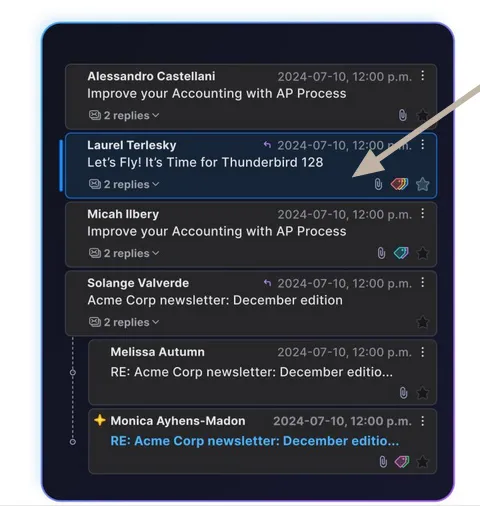
    ich hatte mir ein paar css Befehle für die Kartenansicht in TB 115 zusammen gesucht. Leider funktionieren die nicht mehr.

    Kennt jemand die Syntax für z.B. :


    - Hintergrundfarbe für ungelesene Nachrichten (bekomme z.Zt. nur einen kleinen grünen Punkt)

    - Farbe für markierte Nachrichten

  • Bastler
    Guest
    • July 29, 2024 at 10:41 AM
    • #2
    Quote from heinzie

    Leider funktionieren die nicht mehr.

    Hallo,
    am besten den bisherigen Code über diese Forenfunktion hier einstellen.
    Dann kann besser beurteilt werden, worauf es ankommt.

  • heinzie
    Member
    Reactions Received
    3
    Posts
    52
    Member since
    9. Aug. 2018
    • July 29, 2024 at 11:02 AM
    • #3

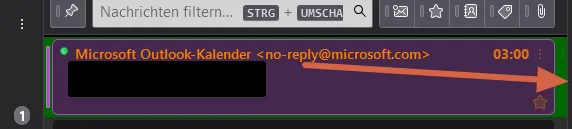
    ich glaube das Problem ist, dass der alte Code nur auf den gesamten Hintergrund der eigentlichen Karten wirkt und nicht auf die Karten selber. Im Beispiel eine ungelesen Nachricht mit grünem Hintergrund.
    Es oll dann eigentlich die Karte grün werden.

    CSS
    /*
    https://www.thunderbird-mail.de/forum/thread/92385-css-code-f%C3%BCr-themen-nachrichtenliste/?postID=518990#post518990
    */
    
    
    /* Zebra Folderpane */
    treechildren::-moz-tree-cell(selected, focus) {
        appearance: none !important;
        background-color: #006800 !important;
    }
    
    treechildren::-moz-tree-row(selected) {
        appearance: none !important;
        background-color: #38383D !important;
      /*   background-color: #5F5F68 !important; */
    }
    treechildren::-moz-tree-row(selected, focus) {
        appearance: none !important;
        background-color: #38383D !important;
    }
    treechildren::-moz-tree-cell-text(selected),
    treechildren::-moz-tree-cell-text(selected, focus) {
        appearance: none !important;
        color: #FFF !important;
    }
    treechildren::-moz-tree-cell-text(hover),
    treechildren::-moz-tree-cell-text(selected, hover),
    treechildren::-moz-tree-cell-text(selected, focus, hover) {
        appearance: none !important;
        color: #000 !important;
    }
    treechildren::-moz-tree-row(hover),
    treechildren::-moz-tree-row(selected, hover),
    treechildren::-moz-tree-row(selected, focus, hover) {
        appearance: none !important;
        background-color: #D1E2F2 !important;
    }
    
    /* Zebra Threadpane */
    #threadTree tr {
        background-image: none !important;
        background-color: #434343 !important;
    }
    #threadTree tr:nth-child(2n) {
        background-image: none !important;
        background-color: #2e2e2e !important;
    }
    #threadTree tr.selected {
        background-image: none !important;
        background-color: #006800 !important;
    }
    #threadTree tr:nth-child(2n).selected {
        background-image: none !important;
        background-color: #006800 !important;
    }
    #threadTree tr:hover,
    #threadTree tr:nth-child(2n):hover,
    #threadTree tr.selected:hover,
    #threadTree tr:nth-child(2n).selected:hover {
        background-image: none !important;
        background-color: #D1E2F2 !important;
        color: #000 !important;
    }
    
    #threadTree tbody .children.collapsed[data-properties~="hasUnread"][data-properties~="read"] :where(td) {
        appearance: none !important;
        background-color: #F20 !important;
        color: #eee8aa !important;
    }
    #threadTree tbody .children[data-properties~="hasUnread"][data-properties~="read"] :where(td) {
        appearance: none !important;
        background-color: #FF7909 !important;
        color: #000 !important;
    }
    #threadTree tbody .children.collapsed[data-properties~="hasUnread"][data-properties~="read"].selected :where(td) {
        appearance: none !important;
        background-color: #800 !important;
        color: #eee8aa !important;
    }
    #threadTree tbody .children[data-properties~="hasUnread"][data-properties~="read"].selected :where(td) {
        appearance: none !important;
        background-color: #873f05 !important;
        color: #FFF !important;
    }
    #threadTree tbody .children:hover :where(td),
    #threadTree tbody .children.collapsed[data-properties~="hasUnread"][data-properties~="read"]:hover :where(td),
    #threadTree tbody .children[data-properties~="hasUnread"][data-properties~="read"]:hover :where(td),
    #threadTree tbody .children.collapsed[data-properties~="hasUnread"][data-properties~="read"].selected:hover :where(td),
    #threadTree tbody .children[data-properties~="hasUnread"][data-properties~="read"].selected:hover :where(td){
        appearance: none !important;
        background-color: #D1E2F2 !important;
        color: #000 !important;
    }
    
    tr[data-properties~="imapdeleted"][data-properties~="read"] {
        color: #fc4242 !important;
    }
    tr[data-properties~="untagged"][data-properties~="unread"] {
        color: #fc7e00 !important;
    }
    tr[data-properties~="new"][data-properties~="unread"] :where(td) {
        appearance: none !important;
        color: #62cf61 !important;
    }
    Display More
  • heinzie
    Member
    Reactions Received
    3
    Posts
    52
    Member since
    9. Aug. 2018
    • July 29, 2024 at 11:25 AM
    • #4

    kann man diese Kartenfunktion ggf. auch generell abschalten, wäre auch eine Lösung für mich

  • HardyH
    Senior Member
    Reactions Received
    112
    Posts
    523
    Member since
    1. Jul. 2010
    Helpful answers
    3
    • July 29, 2024 at 12:32 PM
    • #5

    Hallo,

    Quote from heinzie

    Kartenfunktion ggf. auch generell abschalten

    Einstellungen - Ansicht - Fensterlayout - "Kopfzeile der Nachrichtenliste" aktivieren. Dort dann ganz rechts entsprechend anklicken und aktivieren. Wenn die Kopfzeile wieder weg soll - auch wieder deaktivieren.

  • heinzie
    Member
    Reactions Received
    3
    Posts
    52
    Member since
    9. Aug. 2018
    • July 29, 2024 at 12:40 PM
    • #6
    Quote from HardyH

    Hallo,

    Quote from heinzie

    Kartenfunktion ggf. auch generell abschalten

    Einstellungen - Ansicht - Fensterlayout - "Kopfzeile der Nachrichtenliste" aktivieren. Dort dann ganz rechts entsprechend anklicken und aktivieren. Wenn die Kopfzeile wieder weg soll - auch wieder deaktivieren.

    Danke, aber ich dachte nur an die zusätzlichen Karten die ab Version 128 über der Kartenansicht von 115 liegen.

  • dharkness21
    Senior Member
    Reactions Received
    492
    Posts
    2,051
    Member since
    29. Jun. 2005
    Helpful answers
    55
    • July 29, 2024 at 5:23 PM
    • #7
    Quote from heinzie

    ich glaube das Problem ist, dass der alte Code nur auf den gesamten Hintergrund der eigentlichen Karten wirkt und nicht auf die Karten selber. Im Beispiel eine ungelesen Nachricht mit grünem Hintergrund.
    Es oll dann eigentlich die Karte grün werden.

    Teste bitte das ↓.

    CSS
    #threadTree tbody tr[data-properties~="unread"] .card-container {
        background-color: #0082FC !important;
    }
    #threadTree tbody tr[data-properties~="unread"][data-properties~="new"] .card-container {
        background-color: #006800 !important;
    }
    #threadTree tbody tr.selected .card-container {
        background-color: #800 !important;
    }
    #threadTree tbody tr .card-container:hover,
    #threadTree tbody tr[data-properties~="unread"] .card-container:hover,
    #threadTree tbody tr[data-properties~="unread"][data-properties~="new"] .card-container:hover,
    #threadTree tbody tr.selected .card-container:hover {
        background-color: #D1E2F2 !important;
        color: #000 !important;
    }
    Display More

    und wech

    Dharkness

  • heinzie
    Member
    Reactions Received
    3
    Posts
    52
    Member since
    9. Aug. 2018
    • July 29, 2024 at 7:06 PM
    • #8
    Quote from dharkness21
    Quote from heinzie

    ich glaube das Problem ist, dass der alte Code nur auf den gesamten Hintergrund der eigentlichen Karten wirkt und nicht auf die Karten selber. Im Beispiel eine ungelesen Nachricht mit grünem Hintergrund.
    Es oll dann eigentlich die Karte grün werden.

    Teste bitte das ↓.

    CSS
    #threadTree tbody tr[data-properties~="unread"] .card-container {
        background-color: #0082FC !important;
    }
    #threadTree tbody tr[data-properties~="unread"][data-properties~="new"] .card-container {
        background-color: #006800 !important;
    }
    #threadTree tbody tr.selected .card-container {
        background-color: #800 !important;
    }
    #threadTree tbody tr .card-container:hover,
    #threadTree tbody tr[data-properties~="unread"] .card-container:hover,
    #threadTree tbody tr[data-properties~="unread"][data-properties~="new"] .card-container:hover,
    #threadTree tbody tr.selected .card-container:hover {
        background-color: #D1E2F2 !important;
        color: #000 !important;
    }
    Display More

    Vielen Dank, funktioniert wieder auf Anhieb. Wo holst du nur immer so schnell die Infos weg.

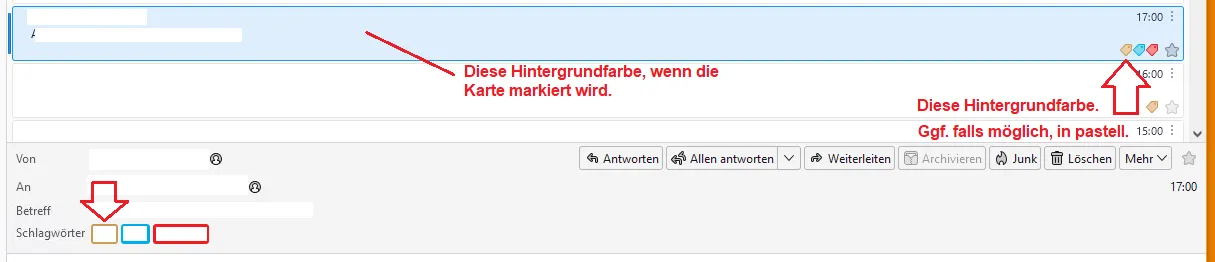
    Könnte man auch die Farbe ändern wenn z.B. die Mail gekennzeichnet wäre?

  • dharkness21
    Senior Member
    Reactions Received
    492
    Posts
    2,051
    Member since
    29. Jun. 2005
    Helpful answers
    55
    • July 29, 2024 at 7:58 PM
    • #9
    Quote from heinzie

    Wo holst du nur immer so schnell die Infos weg.

    Die ermittle ich mit dem Entwickler-Werkzeugkasten, den findest Du im Menü Extras unter Entwickler-Werkzeuge.

    Quote from heinzie

    Könnte man auch die Farbe ändern wenn z.B. die Mail gekennzeichnet wäre?

    Das wäre dann das ↓.

    CSS
    #threadTree tbody tr[data-properties~="flagged"] .card-container {
        background-color: #00407c !important;
    }
    #threadTree tbody tr[data-properties~="unread"][data-properties~="flagged"] .card-container {
        background-color: #00274c !important;
    }

    und wech

    Dharkness

  • heinzie
    Member
    Reactions Received
    3
    Posts
    52
    Member since
    9. Aug. 2018
    • July 30, 2024 at 9:17 AM
    • #10
    Quote from dharkness21
    Quote from heinzie

    Wo holst du nur immer so schnell die Infos weg.

    Die ermittle ich mit dem Entwickler-Werkzeugkasten, den findest Du im Menü Extras unter Entwickler-Werkzeuge.

    Quote from heinzie

    Könnte man auch die Farbe ändern wenn z.B. die Mail gekennzeichnet wäre?

    Das wäre dann das ↓.

    CSS
    #threadTree tbody tr[data-properties~="flagged"] .card-container {
        background-color: #00407c !important;
    }
    #threadTree tbody tr[data-properties~="unread"][data-properties~="flagged"] .card-container {
        background-color: #00274c !important;
    }

    Danke, jetzt ist es perfekt für mich.

  • dharkness21
    Senior Member
    Reactions Received
    492
    Posts
    2,051
    Member since
    29. Jun. 2005
    Helpful answers
    55
    • July 30, 2024 at 7:28 PM
    • #11
    Quote from heinzie

    Danke, jetzt ist es perfekt für mich.

    Aber gerne doch. :)

    und wech

    Dharkness

  • Sehvornix
    Senior Member
    Reactions Received
    915
    Posts
    2,619
    Member since
    6. Jul. 2017
    Helpful answers
    40
    • October 12, 2024 at 6:29 PM
    • #12

    dharkness21,

    wie kann man den Hintergrund einer Mail-Karte in der Kartenansicht in der Farbe des ersten zugeordneten Schlagwortes färben?

    Dein Code oben färbt es statisch ein. Ich möchte gerne mit dynamischer Färbung testen.

    Display Spoiler
    CSS
    #threadTree tbody tr[data-properties~="unread"] .card-container {
        background-color: #0082FC !important;
    }
    #threadTree tbody tr[data-properties~="unread"][data-properties~="new"] .card-container {
        background-color: #006800 !important;
    }
    #threadTree tbody tr.selected .card-container {
        background-color: #800 !important;
    }
    #threadTree tbody tr .card-container:hover,
    #threadTree tbody tr[data-properties~="unread"] .card-container:hover,
    #threadTree tbody tr[data-properties~="unread"][data-properties~="new"] .card-container:hover,
    #threadTree tbody tr.selected .card-container:hover {
        background-color: #D1E2F2 !important;
        color: #000 !important;
    }
    Display More

    Geht das mit der Kartenansicht? Das wäre dann nämlich in etwa so, wie es in der Tabellenansicht möglich ist.

    Gruß
    Sehvornix

    Keyboard not found. Press any key to continue.

  • Grisu2099
    Senior Member
    Reactions Received
    506
    Posts
    708
    Member since
    8. Oct. 2023
    Helpful answers
    8
    • October 12, 2024 at 7:01 PM
    • #13

    Bitte mal testen:

    CSS
    [is="tree-view-table-body"] {
    	& > .card-layout > td {
    		& > .card-container {
    			background-color: rgb(50,50,52) !important;
    			border: 2px ridge rgb(211,211,211) !important;
    			border-radius: 10px !important;
    			padding: 2px 10px 2px 5px !important;
    			}
    		}
    	}
    [is="tree-view-table-body"] {
    	& > .card-layout > td[aria-selected] {
    		& > .card-container {
    			background-color: rgb(0,128,0) !important;
    			color: #000000 !important;
    			}
    		}
    	}
    [is="tree-view-table-body"] {
    	& > .card-layout > td {
    		& > .card-container:hover {
    			background-color: rgb(0,200,0) !important;
    			color: #000000 !important;
    			}
    		}
    	}
    [is="tree-view-table-body"] {
    	& > .card-layout {
    		&:is(:hover, :focus, :focus-within) {
    			& .card-container {
    				box-shadow: none !important;
    				}
    			}
    		}
    	}
    #threadTree[rows="thread-card"] {
    	& .card-layout {
    		& td {
    			& .card-container {
    				& .tag-icon {
    					-moz-context-properties: fill, stroke !important;
    					width: 16px !important;
    					height: 16px !important;
    					fill: transparent !important;
    					stroke: var(--tag-color) !important;
    					}
    				}
    			}
    		}
    	}
    Display More

    Farben bitte anpassen - ist für dunklen TB gemacht... :saint:

  • Sehvornix
    Senior Member
    Reactions Received
    915
    Posts
    2,619
    Member since
    6. Jul. 2017
    Helpful answers
    40
    • October 12, 2024 at 7:42 PM
    • #14

    Das ist die richtige Stelle, aber das CSS färbt statisch ein, nicht entsprechend dem jeweiligen Label.

    Es müsste eine Möglichkeit geben, wie pro Mailkarte die Farbe des ersten Labels zum Einfärben genommen wird. Also nicht

    Code
    background-color: rgb(50,50,52)

    , sondern irgendwie über eine custom propertie.

    Code
    background-color: var(--labelcolour)

    oder wie auch immer man auf die Label referenzieren könnte.

    Gruß
    Sehvornix

    Keyboard not found. Press any key to continue.

  • Grisu2099
    Senior Member
    Reactions Received
    506
    Posts
    708
    Member since
    8. Oct. 2023
    Helpful answers
    8
    • October 12, 2024 at 7:59 PM
    • #15

    Ich verstehe was du möchtest. Ob ich das zusammengeschraubt kriege - mal sehen...:/:saint:

  • dharkness21
    Senior Member
    Reactions Received
    492
    Posts
    2,051
    Member since
    29. Jun. 2005
    Helpful answers
    55
    • October 12, 2024 at 8:03 PM
    • #16
    Quote from Sehvornix
    Quote from Sehvornix

    Geht das mit der Kartenansicht? Das wäre dann nämlich in etwa so, wie es in der Tabellenansicht möglich ist.

    Ich möchte gerne mit dynamischer Färbung testen.

    Das wird aufwändiger, Du müsstest für jedes Schlagwort einen passenden Eintrag nach diesem ↓ Schema erstellen, dieser Eintrag sollte bei Nachrichten mit dem Schlagwort Persönlich funktionieren.

    CSS
    #threadTree tbody tr[data-properties~="T_24label3"] .card-container {
        background-color: var(--tag-color) !important;
    }

    Ich weiß allerdings nicht genau, ob es funktioniert, einfach mal testen.

    und wech

    Dharkness

  • Sehvornix
    Senior Member
    Reactions Received
    915
    Posts
    2,619
    Member since
    6. Jul. 2017
    Helpful answers
    40
    • October 12, 2024 at 8:09 PM
    • #17

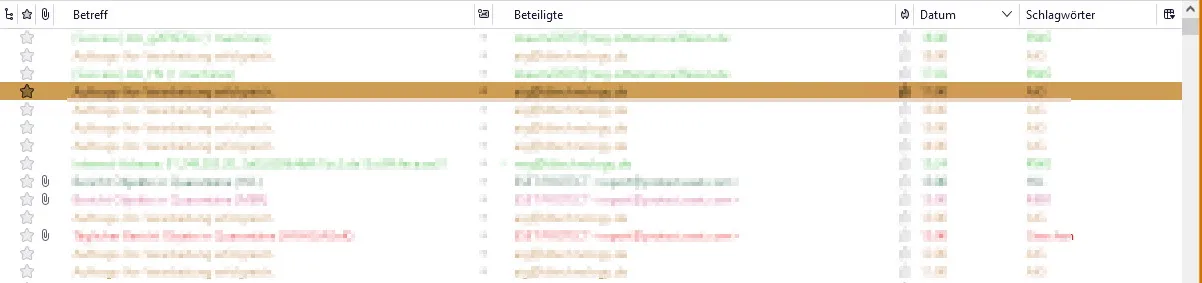
    Zur Illustration, worum es mir geht, hier das Pendant in der Tabellenansicht:

    Da wird entsprechend dem Schlagwort der Text eingefärbt, wenn die Zeile nicht markiert ist. In meinem Use-Case ist immer nur ein Schlagwort pro Mail zugewiesen. Insofern ist die Farbgebung eindeutig. Markiert man eine Zeile, wählt Thunderbird zum Hervorheben der Zeile nach einem nicht so ganz genau bekannten Verfahren als Hintergrundfarbe der Zeile die Farbe des Schlagwortes und setzt den Text dazu passend für genügend Kontrast entweder schwarz oder weiß, je nach dem, wie hell oder dunkel die Schlagwortfarbe angelegt ist.

    Dieses Farb-Konzept würde ich gerne so ähnlich auf die Kartenansicht übertragen. In der Kartenansicht muss der Text erst einmal nicht gefärbt werden. Dafür sind ja die Label da und wenn mann die im Bedarfsfall ent-stacken kann, reicht mir das vorläufig. Aber mir fehlt die Hintergrundfärbung der markierten Mail-Kachel in der Farbe des Labels.

    Gruß
    Sehvornix

    Keyboard not found. Press any key to continue.

  • Grisu2099
    Senior Member
    Reactions Received
    506
    Posts
    708
    Member since
    8. Oct. 2023
    Helpful answers
    8
    • October 12, 2024 at 8:14 PM
    • #18

    Klappt grundsätzlich - aber die tag-icons sind dann natürlich schlecht bis gar nicht mehr zu erkennen... ;)

    Andere Idee: Wie wäre es, den Text entsprechend der Schlagwortfarbe einzufärben?

  • Sehvornix
    Senior Member
    Reactions Received
    915
    Posts
    2,619
    Member since
    6. Jul. 2017
    Helpful answers
    40
    • October 12, 2024 at 8:25 PM
    • #19
    Quote from dharkness21

    dieser Eintrag sollte bei Nachrichten mit dem Schlagwort Persönlich funktionieren.

    Das funktioniert :)

    Das Schlagwort 'Persönlich' habe ich jedoch normal nicht in Gebrauch.

    Wo kann ich die Zuordnung der

    Code
    data-properties~="T_24label3"

    zu den Schlagworten finden? Statt 'T_xxlabelzz' würde ich bei mir Einträge wie 'T_xxname' suchen und hoffentlich finden. Es sind zwar ca. 28 Label, aber nur selten Änderungen / Ergänzungen im Bestand. Da könnte ich damit gut leben, dazu passendes CSS anzulegen.

    Gruß
    Sehvornix

    Keyboard not found. Press any key to continue.

  • dharkness21
    Senior Member
    Reactions Received
    492
    Posts
    2,051
    Member since
    29. Jun. 2005
    Helpful answers
    55
    • October 12, 2024 at 8:31 PM
    • #20
    Quote from Sehvornix

    Das funktioniert :)

    Wo kann ich die Zuordnung der

    Code
    data-properties~="T_24label3"

    zu den Schlagworten finden?

    Die Schlagworte findest Du in der prefs.js, suche dort mal nach z.B label1 oder label3, das ganze vervollständigst Du dann jeweils zu T_24labelX, wobei das X für die jeweilige gefundene Zahl steht.

    und wech

    Dharkness

Current app version

  • Thunderbird 153.0.2 veröffentlicht

    Thunder August 4, 2026 at 10:28 PM

Current 153 ESR version

  • Thunderbird 153.0.2 ESR veröffentlicht

    Thunder August 4, 2026 at 10:34 PM

Current 140 ESR version

  • Thunderbird 140.13.0 ESR veröffentlicht

    Thunder July 22, 2026 at 7:16 PM

No Advertisements

There are no advertisements here. Maybe you give the website owner (Alexander Ihrig - aka "Thunder") instead something to be able to finance these sites in the long run. Many Thanks!

Thank you for the support!

Coffee to be spent?

Donate now via Paypal*

*Forwarding to PayPal.Me

Similar Threads

  • Problem mit userChrome.css

    • schlatti4
    • July 22, 2024 at 1:08 AM
    • Allgemeines Arbeiten / Konten einrichten / Installation & Update
  • Thunderbird Beta 122 bis Beta 128 hat Dateibeschädigung in IMAP-Konten

    • jorgk3
    • February 15, 2024 at 1:30 PM
    • Thunderbirds Entwicklerversionen
  • TB 115 was soll neu sein an der Oberfläche?

    • Schrotty
    • July 8, 2023 at 12:05 PM
    • Thunderbirds Entwicklerversionen
  • [TB 102] userChrome.css anpassen: Beste Praxis

    • thun.der.bird
    • August 9, 2022 at 10:51 PM
    • Manuelle Anpassungen per CSS oder Script
Thunderbird Mail DE
  1. Imprint & Contact
  2. Privacy Policy
    1. Cookie Policy
  3. Terms of Use
  4. Donation Call for Thunderbird
Help for this website
  • All website support articles
  • How to use website search
  • How to create a forums user account
  • How to create and edit a forums thread
  • How to reset your forums password
Copyright © 2003-2026 Thunderbird Mail DE

You are NOT on an official page of the Mozilla Foundation. Mozilla®, mozilla.org®, Firefox®, Thunderbird™, Bugzilla™, Sunbird®, Seamonkey®, XUL™ and the Thunderbird logo are (among others) registered trademarks of the Mozilla Foundation.

Powered by WoltLab Suite™